

DailyBuild Construction Daily Reports App
    Free Excel Template · No signup

    Free Construction Change Order Log Template for Excel

    Track every COR, PCO, field directive, approved change order, and backcharge with proposed pricing, approved amounts, status, due dates, schedule impacts, and overdue alerts - all in one professional Excel log.

    Download Free Excel Template
    Track change orders

    14-day free trial. No credit card required

    Preview Template

    Used by contractors to track millions in change order value.

    • No signup required
    • Microsoft Excel compatible
    • Auto-calculated variance & overdue
    • 100% free
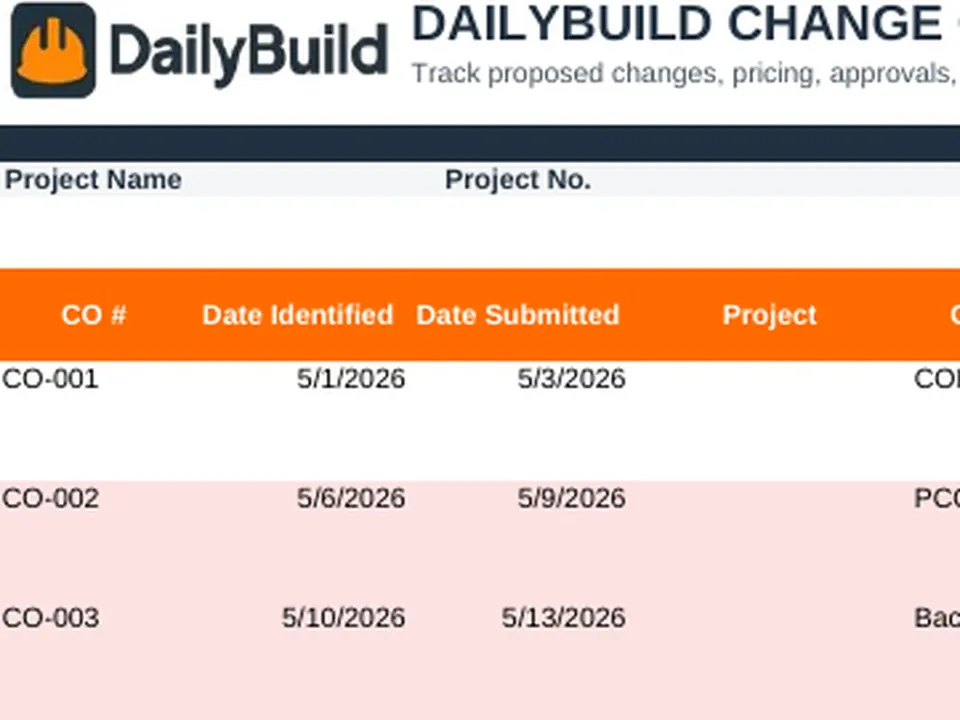
    Free construction change order log Excel template preview - project info, change order summary tiles, status, proposed and approved amounts, due dates
    DailyBuild_Free_Change_Order_Log_Template.xlsx
    Download
    Free bundle

    Get all 30 construction templates

    Editable Excel files plus the paper-to-app checklist. Enter your email for the complete construction bundle.

    Instant download | One email list | Unsubscribe anytime

    What's inside the template

    Three tabs. Every detail contractors need to control change orders.

    Project Information

    Project name, number, client, prepared-by, and reporting date pulled from your Settings tab.

    Change Order Log

    Single-row entries for every COR, PCO, field directive, approved CO, or backcharge with 24 tracked fields.

    Summary Tiles

    Live counts of total, pending, approved, and overdue change orders plus approved and pending dollar value.

    Pricing & Variance

    Track proposed amount, approved amount, and the auto-calculated variance for every change order.

    Days Open & Days Late

    Automatic aging counters based on submission date, due date, and approval date.

    Schedule Impact

    Flag schedule impact yes/no and capture the number of additional days requested per change.

    Settings Tab

    Customize project info, status options, priorities, change types, and reason codes once - applies everywhere.

    Dashboard

    At-a-glance summary of total value, approved value, pending value, overdue items, and counts by status and reason.

    Instructions Tab

    Step-by-step guidance so any PM, super, or admin can use the log on day one.

    What's included

    Everything you need to manage change orders.

    Built from real change order workflows used by GCs, subs, and owners. Nothing missing, nothing extra.

    Project Information Header

    Project name, number, client, prepared-by, report date, and company name in one clean header.

    24-Field Change Order Log

    Track CO number, dates, change type, title, scope, requested by, responsible party, status, and more.

    Proposed & Approved Amounts

    Capture proposed pricing and approved value with automatic variance calculations.

    Auto Variance Calculations

    Approved minus proposed amount calculated automatically for every row.

    Days Open Counter

    Each change order ages automatically from submission date until approval or rejection.

    Days Late Counter

    Overdue items flag automatically when the due date passes without a final disposition.

    Schedule Impact Tracking

    Flag schedule impact and log days requested for each change order.

    Live Summary Tiles

    Total, pending, approved, and overdue CO counts plus approved and pending dollar value.

    Dashboard Reporting

    Counts and dollar totals by status and reason code roll up automatically.

    Configurable Dropdowns

    Status, priority, change type, reason codes - all driven by the Settings tab.

    Print & PDF Ready

    Formatted for clean PDF export, owner reporting, and printed records.

    100% Free

    No subscription, no email, no credit card required.

    Why change orders matter

    Why contractors track every change order.

    A change order log is the single most important financial document on a construction project after the contract itself. It is the running record of every scope change, pricing proposal, owner directive, unforeseen condition, and backcharge across the life of a job. The contractor with a clean change order log gets paid for the work they actually performed. The contractor without one leaves money on the table - every single project.

    Protecting your margin

    Most construction projects are won at a thin margin. Uncaptured changes - the small owner-requested tweak, the field directive, the differing site condition - are where that margin quietly bleeds out. A disciplined change order tracking template ensures every scope change becomes a priced, dated, and approved line item instead of free work.

    Cash flow control

    Change orders sitting in "Pricing" or "Under Review" for 30, 60, 90 days quietly destroy cash flow. A log with auto-calculated Days Open and Days Late surfaces aging change orders so PMs can chase approvals before they become collections problems.

    Defending delay claims

    When a schedule extension request hits the owner's desk, the supporting evidence is your change order log. Approved changes with documented schedule impact and additional days requested establish the contemporaneous record that arbitrators, mediators, and owners expect to see.

    Owner communication

    Sending the owner a weekly change order log summary - total proposed value, approved value, pending value, overdue items - sets a tone of transparency and control. Owners stop asking "where are we on changes?" because the answer is already in their inbox.

    Subcontractor accountability

    Backcharges and sub-driven changes need the same paper trail as owner changes. A dedicated COR log template with reason codes turns backcharge disputes from arguments into documentation reviews.

    Pay application support

    Every approved change order should flow into the next pay application as a separately billed line. A log that shows approved date and approved amount makes pay app preparation a paperwork exercise instead of a guessing game.

    Dispute prevention

    The best change order disputes are the ones that never happen. A complete change order log excel template makes scope, pricing, and approval status unambiguous from day one - which is why projects that document the most rarely end up in litigation.


    How to use the template

    Log a complete change order in 2 minutes.

    1. 01

      Customize the Settings tab

      Enter your default project info, company name, and tweak status options, priorities, change types, and reason codes to match your workflow.

    2. 02

      Enter a new change order

      Add a CO number, date identified, date submitted, change type (COR, PCO, field directive, backcharge), and a clear title.

    3. 03

      Describe the scope

      Capture the full scope of the change in the Description column so anyone reading it later understands exactly what was done.

    4. 04

      Set status, priority, and reason code

      Use the dropdowns to keep reporting clean - Pending, Under Review, Pricing, Approved, Rejected, Executed, or Void.

    5. 05

      Enter proposed and approved amounts

      Variance calculates automatically. Enter the approved amount only once the change order is signed off.

    6. 06

      Log schedule impact and due date

      Flag schedule impact yes/no, enter days requested, and set the due date. Days Open and Days Late update automatically.

    7. 07

      Review the Dashboard

      Check total proposed value, approved value, pending value, overdue items, and counts by status and reason code.

    8. 08

      Export or share

      Save the workbook, export to PDF, or email the log to your owner, PM, or accounting team.

    Template benefits

    The difference a real change order log makes.

    Without a Change Order Log

    • Uncaptured changes
    • Margin erosion
    • Aging approvals
    • Weak delay claims
    • Disputed backcharges

    With DailyBuild Change Order Log

    • Every change captured
    • Protected margin
    • Faster approvals
    • Stronger claims
    • Cleaner pay applications
    • Owner transparency

    Excel vs. DailyBuild

    When change order tracking outgrows the spreadsheet.

    The template is perfect for one job and one PM. DailyBuild handles every job, every change, from the field.

    CapabilityExcel TemplateDailyBuild Software
    Change Order Log
    Proposed & Approved Amounts
    Status Tracking
    Days Open / Days Late
    Schedule Impact
    Dashboard Reporting
    Daily Reports
    Photos on Change Orders
    Owner Signatures
    Mobile App
    Cloud Storage
    Automatic PDF Reports
    Team Collaboration
    Linked to Pay Applications
    Searchable History

    What changes when you switch

    • Weather fills itself in for every report
    • Crew hours flow straight into timesheets
    • One tap sends a branded, signed PDF
    Start Free Trial

    Ready to automate change order tracking?

    Inside DailyBuild

    Change order tracking in DailyBuild

    • Every change tracked by status
    • Linked to the project record
    • Photos and notes attached
    Start Free Trial

    No credit card required to start your trial

    Frequently asked

    Change Order Log Template FAQs

    More free templates

    Available now

    Free Construction Daily Report Template

    Track labor, weather, deliveries, and delays on every jobsite.

    Open template
    Available now

    Free Construction Timesheet Template

    Track employee and crew hours across projects.

    Open template
    Coming soon

    Free RFI Log Template

    Manage requests for information and turnaround time.

    Notify me
    Coming soon

    Free Submittal Log Template

    Track submittals from request to approval.

    Notify me
    Coming soon

    Free Equipment Log Template

    Monitor equipment usage, hours, and maintenance.

    Notify me
    Coming soon

    Free Punch List Template

    Close out projects with a clean punch list.

    Notify me
    Coming soon

    Free Safety Inspection Template

    Run jobsite safety inspections in minutes.

    Notify me
    Coming soon

    Free Job Costing Template

    Track project budget, actuals, and variance by cost code.

    Notify me
    Free iPhone and Android apps

    Run these logs from your phone

    The DailyBuild app turns the same daily report, timesheet and punch list into something your crew fills out on site - photos, hours and signatures included, with branded PDFs sent automatically.

    Download DailyBuild on the App StoreGet DailyBuild on Google Play
    DailyBuild mobile app Today screen with today's report, time, photo and safety actions

    Stop Letting Change Orders Erode Your Margin

    Download the free DailyBuild Change Order Log Template today or upgrade to DailyBuild to automate change orders, daily reports, timesheets, photos, signatures, and PDF reporting from one place.
