

DailyBuild Construction Daily Reports App
    Free Excel Template · No signup

    Free Construction Timesheet Template for Excel

    Download a free construction timesheet template for Excel or Google Sheets in one click - no email, no signup. Track crew hours, overtime, cost codes, equipment usage, and weekly payroll totals on every job.

    Download Free Excel Template
    Track crew hours

    14-day free trial. No credit card required

    Preview Template

    Trusted by thousands of contractors worldwide.

    • Excel Compatible
    • Google Sheets Compatible
    • Printable
    • 100% Free
    • No Signup Required

    Quick answer

    What should a construction timesheet include?

    A construction timesheet should connect each worker's time to the correct date, project, trade, and cost code so the same record can support payroll and job costing.

    • Employee name or ID, trade, project, and work date
    • Start time, end time, breaks, and total regular hours
    • Overtime hours calculated under the applicable company and local rules
    • Cost code, work activity, and location for each time entry
    • Equipment hours, notes, employee or foreman sign-off, and approval status

    Wage, overtime, break, and retention rules vary by location and workforce. Configure the workbook to match your payroll policy and applicable requirements.

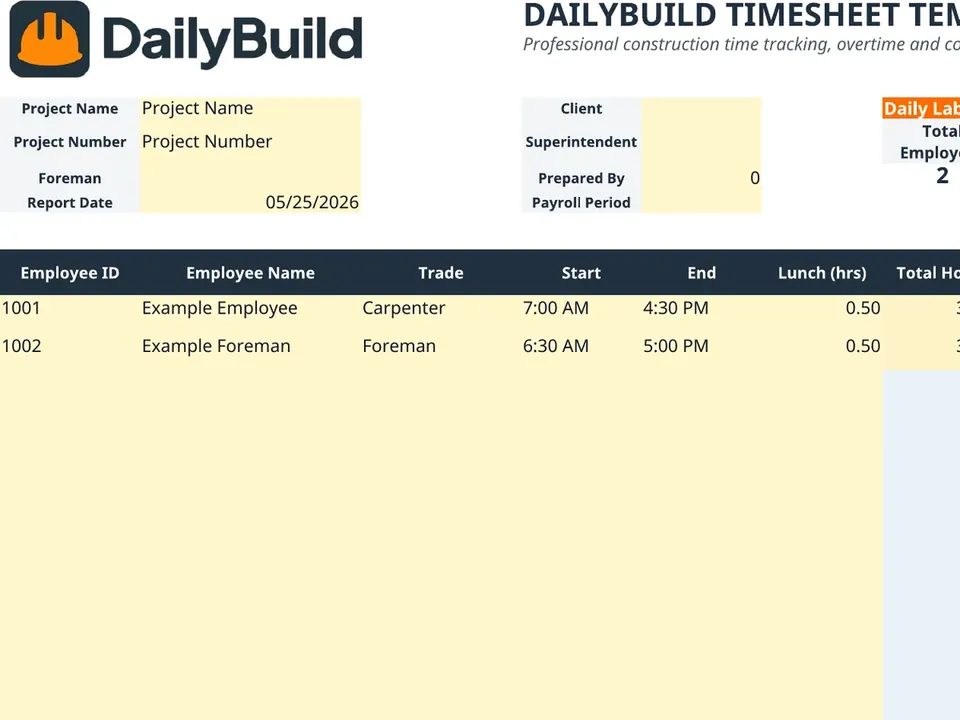
    Free construction timesheet Excel template preview - project info, employee labor, overtime, cost codes, equipment, and material deliveries
    DailyBuild-Timesheet-Template.xlsx
    Download
    Free bundle

    Get all 30 construction templates

    Editable Excel files plus the paper-to-app checklist. Enter your email for the complete construction bundle.

    Instant download | One email list | Unsubscribe anytime

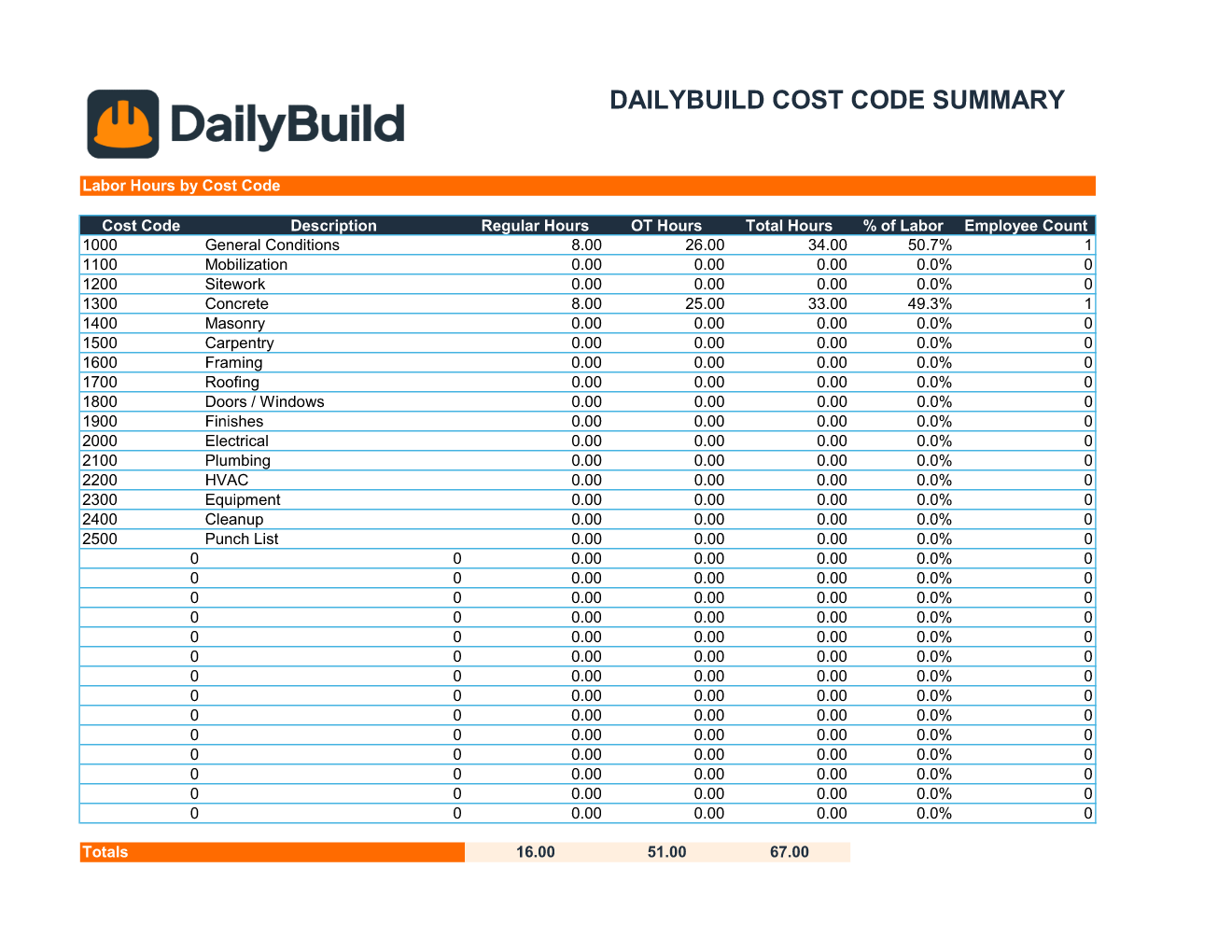
    DailyBuild timesheet cost code summary - labor hours, overtime, percentage of labor, and employee count per cost code

    Cost Code Summary tab - automatic rollup of labor hours, OT, and headcount per cost code.

    Inside the template

    Six tabs. Everything your payroll admin needs.

    Daily Timesheet

    Track employee start times, end times, lunch breaks, regular hours, overtime hours, and cost code allocations.

    Weekly Summary

    Roll up total regular and overtime hours by employee for one-glance payroll review.

    Cost Code Dashboard

    See labor hours, percentage of labor, and headcount allocated to every cost code on the job.

    Equipment Tracking

    Log equipment, operator, start/end time, and hours against the right cost code.

    Settings Tab

    Configure trades, cost codes, OT rules, and dropdown options to match your company's workflow.

    Instructions Tab

    Step-by-step guidance so any foreman or admin can use the template on day one.

    What's included

    Everything contractors need to track labor.

    Built from real payroll workflows used by GCs, subs, and project teams. Nothing missing, nothing extra.

    Employee Time Tracking

    Track employee work hours accurately, day by day.

    Automatic Overtime Calculations

    Automatically separate regular and overtime hours based on your OT rules.

    Cost Code Tracking

    Allocate labor hours to specific project cost codes for clean job costing.

    Weekly Payroll Summary

    View total hours and overtime by employee, ready for payroll export.

    Equipment Time Tracking

    Track equipment usage and operator hours alongside labor.

    Labor Productivity Reporting

    Monitor workforce efficiency and surface productivity trends.

    Foreman Notes

    Document daily progress, blockers, and field observations.

    Data Validation

    Reduce entry errors with built-in dropdown menus and validation.

    Dashboard Reporting

    Visual labor and cost code summaries roll up automatically.

    Print Ready Layout

    Professional reports formatted for payroll and management.

    Easy Customization

    Modify fields, trades, and codes to match your company workflows.

    100% Free

    No hidden costs. No subscription. No email required.

    Why timesheets matter

    Why contractors need timesheets.

    What is a construction timesheet?

    A construction timesheet is a structured record of the hours each worker spends on a project, broken out by day, trade, and cost code. It's the source-of-truth document that drives payroll, job costing, and labor productivity analysis on every construction project - from a one-week residential remodel to a multi-year commercial build.

    Why accurate labor tracking matters

    Labor is the single largest controllable cost on most construction projects. A 2% error on labor hours can wipe out the margin on an entire job. Accurate, daily-captured time data - not weekly memory dumps - protects your margin, defends your invoices, and gives you the data you need to bid the next job sharper.

    Benefits of tracking labor hours

    Tracking labor hours daily creates a productivity baseline you can use across projects. Over time, you learn which crews and which scopes consistently beat - or miss - your estimate. That feedback loop is how the best contractors keep getting better while their competitors keep guessing.

    Improving job costing accuracy

    A construction cost code timesheet forces every labor hour to live inside a cost bucket. That makes job costing real, not theoretical. You stop guessing how much labor went into concrete vs. framing vs. finishes - you know.

    Managing overtime costs

    Overtime is where margins quietly die. Without visibility, OT creeps up week after week. With a disciplined timesheet, OT is flagged the moment it happens, so PMs can rebalance crews, push schedule, or have the hard conversation with the foreman before it becomes a problem on the next pay app.

    Payroll accuracy

    Structured start, end, and lunch fields eliminate the "about 8 hours" guesswork. Your payroll administrator stops reconciling text messages and crumpled paper sheets, and your team gets paid exactly what they worked - every cycle, on time.

    Labor productivity monitoring

    When hours are tied to cost codes and scope, you can compute real productivity rates: linear feet per hour, square feet per hour, units installed per crew-day. Those rates compound into sharper estimates, better schedules, and stronger margins.

    Cost code reporting

    The Cost Code Summary dashboard in this template shows total hours, OT, percentage of labor, and headcount per code. It's the report owners love, your accountant relies on, and your estimator uses to calibrate the next bid.

    Documentation protection

    Detailed timesheets are contemporaneous evidence. If a wage claim, a workers' comp investigation, or a labor dispute arises, your timesheets are the document everyone - DOL, insurers, attorneys - asks for first. A clean record protects the company.

    Project profitability tracking

    Job costing without labor data is fiction. With a disciplined contractor timesheet template, actual labor cost flows into your project P&L every week - so you know which jobs are making money while there's still time to act.


    How to use the template

    A complete weekly timesheet in 10 minutes.

    1. 01

      Enter project information

      Add project name, number, client, superintendent, foreman, and report date in the header.

    2. 02

      Add employees and trades

      List each employee with their ID, name, and trade - carpenter, foreman, laborer, electrician, and so on.

    3. 03

      Enter start time, end time and lunch duration

      Log each shift. Hours calculate automatically from start, end, and lunch fields.

    4. 04

      Assign cost codes

      Allocate each row of hours to the right project cost code so job costing rolls up correctly.

    5. 05

      Review automatic overtime calculations

      Regular and overtime hours split automatically based on your configured OT threshold.

    6. 06

      Track equipment usage

      Use the equipment section to log machine hours, operators, and cost codes for rentals or owned equipment.

    7. 07

      Review weekly summaries

      Check the rolled-up weekly totals and cost code dashboard before approving payroll.

    8. 08

      Print or export for payroll

      Print the formatted sheet or export to PDF and hand off to your payroll administrator.

    Template benefits

    The difference a real timesheet makes.

    Without a Timesheet System

    • Payroll errors
    • Missing labor records
    • Poor cost tracking
    • Uncontrolled overtime
    • Limited productivity visibility

    With DailyBuild Timesheet Template

    • Accurate payroll
    • Better labor tracking
    • Improved job costing
    • Overtime visibility
    • Strong project documentation
    • Better profitability analysis

    Features breakdown

    Every feature, explained.

    Employee Tracking

    Each employee gets an ID, trade, and a clean row for every shift. Filterable, sortable, and easy to audit.

    Labor Hours

    Formulas calculate total hours from start, end, and lunch - no more manual math or 'about 8 hours' guesses.

    Overtime Calculations

    Configure your OT threshold once. The template separates regular from OT and totals both at the bottom.

    Cost Code Allocation

    Drop-down validated cost codes ensure every hour ties back to a job costing bucket. No more orphaned hours.

    Equipment Hours

    A dedicated equipment block lets you log machine hours, operator, and cost code alongside labor.

    Weekly Summary Reports

    Roll up the week by employee and by trade. Approve and send to payroll in minutes.

    Dashboard Reporting

    A cost code dashboard summarizes labor hours, OT, percentage of labor, and employee count per code.

    Payroll Preparation

    Clean, printable output formatted for payroll handoff - whether you run Gusto, ADP, QuickBooks, or paper checks.

    Excel vs. DailyBuild

    When labor tracking outgrows the spreadsheet.

    The template is perfect for one job and one foreman. DailyBuild handles every job, every crew, from the field.

    CapabilityExcel TemplateDailyBuild Software
    Employee Hours Tracking
    Regular Hours
    Overtime Tracking
    Cost Codes
    Equipment Tracking
    Weekly Summaries
    Daily Reports
    Weather Tracking
    Photo Documentation
    Mobile App
    Cloud Storage
    Task Management
    Calendar View
    Automatic PDF Reports
    Team Collaboration
    Unlimited Historical Records

    What changes when you switch

    • Weather fills itself in for every report
    • Crew hours flow straight into timesheets
    • One tap sends a branded, signed PDF
    Start Free Trial

    Ready to automate labor tracking?

    Inside DailyBuild

    Crew timesheets in DailyBuild

    • Hours logged by cost code
    • Totals add up automatically
    • Overtime calculated for you
    Start Free Trial

    No credit card required to start your trial

    Frequently asked

    Construction Timesheet FAQs

    Free Contractor Toolkit

    The DailyBuild Free Contractor Toolkit.

    Download professional Excel templates contractors actually use on real jobsites - built and maintained by the DailyBuild team.

    • Daily Reports
    • Timesheets
    • RFIs
    • Change Orders
    • Equipment Logs
    • Safety Forms
    • Punch Lists
    Free iPhone and Android apps

    Run these logs from your phone

    The DailyBuild app turns the same daily report, timesheet and punch list into something your crew fills out on site - photos, hours and signatures included, with branded PDFs sent automatically.

    Download DailyBuild on the App StoreGet DailyBuild on Google Play
    DailyBuild mobile app Today screen with today's report, time, photo and safety actions

    Track Labor Hours Like a Professional Contractor

    Download the free DailyBuild Construction Timesheet Template today or upgrade to DailyBuild to automate labor tracking, payroll reporting, daily reports, tasks, weather logs, and project documentation.
