

DailyBuild Construction Daily Reports App
    Free Excel Template · No signup

    Free Construction Daily Report Template for Excel

    Track labor, subcontractors, weather, equipment, deliveries, delays, safety observations, and daily progress with this professional Excel template built specifically for contractors.

    Download Free Excel Template
    Create a daily report

    14-day free trial. No credit card required

    Preview Template

    Used by thousands of contractors worldwide.

    • No signup required
    • Microsoft Excel compatible
    • Printable
    • 100% free

    Quick answer

    What should a construction daily report include?

    A complete construction daily report records the people, conditions, work, interruptions, and decisions that affected the job that day. The best reports are factual, specific, dated, and completed while the details are still fresh.

    • Project, report date, superintendent, and weather conditions
    • Employees, subcontractors, crew hours, and work completed
    • Equipment used, material deliveries, visitors, and inspections
    • Safety observations, incidents, photos, and corrective actions
    • Delays, affected work, notices given, and mitigation steps
    • Next-day plan, signature, and distribution record

    Contract notice and recordkeeping requirements vary. Follow the notice periods and documentation terms in your contract and applicable local requirements.

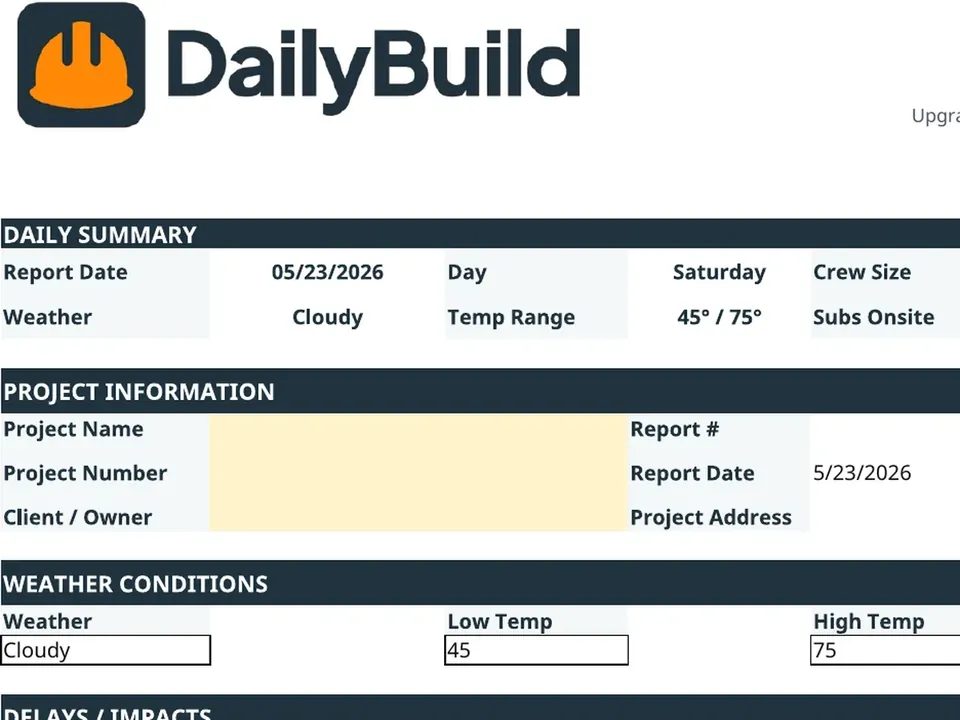
    Free construction daily report Excel template preview - project info, weather, employee hours, subcontractor hours, deliveries, safety, and delays
    Daily-Report-DailyBuild.xlsx
    Download
    Free bundle

    Get all 30 construction templates

    Editable Excel files plus the paper-to-app checklist. Enter your email for the complete construction bundle.

    Instant download | One email list | Unsubscribe anytime

    What's inside the template

    Nine sections. Every detail a contractor actually tracks.

    Project Information

    Project name, number, superintendent, client, and reporting dates in one clean header.

    Weather Tracking

    Record conditions, high/low temperatures, precipitation, and jobsite impact.

    Labor Tracking

    Log each employee, regular hours, overtime, and the activity they performed.

    Subcontractor Tracking

    Capture sub trade, crew size, hours, and exactly what they completed today.

    Equipment Log

    Monitor on-site equipment, idle time, and utilization across the shift.

    Deliveries Log

    Track materials received, supplier, quantity, and any shortages.

    Safety Section

    Document toolbox talks, inspections, incidents, and safety observations.

    Delay Tracking

    Flag weather, owner, material, equipment, and schedule delays with detail.

    Daily Summary

    Notes for progress, blockers, and the plan for the following workday.

    What's included

    Everything you need for a complete daily report.

    Built from real jobsite reports used by GCs, subs, and owners. Nothing missing, nothing extra.

    Project Information Tracking

    Track project name, report number, superintendent, client, and reporting dates.

    Weather Documentation

    Document weather conditions, temperatures, precipitation, and jobsite impacts.

    Labor Tracking

    Track employees, hours worked, overtime, and daily activities.

    Subcontractor Tracking

    Document subcontractor manpower and work completed.

    Equipment Tracking

    Monitor equipment utilization and jobsite resources.

    Material Deliveries

    Track deliveries and suppliers.

    Safety Documentation

    Record meetings, incidents, inspections, and observations.

    Delay Tracking

    Document weather, owner, material, equipment, and schedule delays.

    Daily Notes

    Capture progress, issues, and next-day planning.

    Automatic Totals

    Instant calculations and summaries across labor and hours.

    Print Ready

    Optimized for clean PDF export and printed reports.

    100% Free

    No subscription, no email, no credit card required.

    Why daily reports matter

    Why contractors document every single day.

    A construction daily report is the single most important record on a jobsite. It is how contractors record what happened on a given day - who was on site, what was built, what got delivered, and why something fell behind schedule. When a dispute or claim surfaces months later, complete daily reports help the project team reconstruct events from dated records rather than memory alone.

    Documentation protection

    A daily construction report is the contractor's contemporaneous record. It is created at the moment work happens, which is exactly what owners, insurers, consultants, and legal teams may review. A consistent daily jobsite report template gives every project the same consistent recordkeeping process.

    Delay claims

    Weather delays, owner-directed delays, differing site conditions, and material shortages can affect time and cost. Record when the delay started and ended, its cause, the activities affected, labor and equipment impacts, photos, notices sent, and steps taken to reduce the impact. A disciplined construction daily log template turns a later recollection into a dated project record. Contract notice rules and deadlines vary, so use the form alongside the notice terms in your contract and advice appropriate to your jurisdiction.

    Labor productivity tracking

    When you log labor hours against tasks daily, you build a productivity baseline. Over a few projects, you can see exactly which crews and which tasks consistently beat - or miss - your estimate. That feedback loop is how the best contractors bid sharper and run leaner than competitors.

    Communication with owners

    Sending a daily report to your owner every evening sets a tone of professionalism and control. Owners stop asking "what happened today?" because they already know. That trust pays dividends when you need a change order approved or a schedule extension granted.

    Subcontractor accountability

    A contractor daily report template that captures sub crew sizes, hours, and work completed turns pay application reviews from a guessing game into a paperwork exercise. Subs who underperform see it in writing. Subs who outperform get recognized.

    Historical project records

    Years from now, when a building owner asks what was installed in a particular wall on a particular day, the answer lives in your daily reports. Same for warranty disputes, defect claims, and any forensic question about how a project was actually built.

    Dispute prevention

    Clear records can resolve questions before they become larger disputes. A complete daily site report template makes the day's facts easier to verify and gives the project team a shared reference for schedule, scope, and payment discussions.


    How to use the template

    Fill out a complete daily report in 5 minutes.

    1. 01

      Enter project information

      Add your project name, number, superintendent, client, and the report date so every page is properly attributed.

    2. 02

      Record weather conditions

      Capture morning conditions, the day's high/low, precipitation, and any weather-related impact on production.

    3. 03

      Track labor and subcontractors

      Log each employee and sub crew with hours and a short description of the work performed.

    4. 04

      Document deliveries and equipment

      Note what was delivered, by whom, and which equipment was active on site.

    5. 05

      Record safety observations

      Log toolbox talks, inspections, incidents, near-misses, and corrective actions taken.

    6. 06

      Document delays

      Flag and describe every delay - weather, owner, material, equipment, or schedule - with cause and impact.

    7. 07

      Save or print report

      Save the workbook, export to PDF, or print directly. Email it to your PM or upload to your project folder.

    Template benefits

    The difference daily reports make.

    Without Daily Reports

    • Missing documentation
    • Poor accountability
    • Weak delay claims
    • Lost project history

    With Daily Reports

    • Better records
    • Stronger claims
    • Improved communication
    • Increased professionalism
    • Better project management

    Excel vs. DailyBuild

    When you outgrow the spreadsheet.

    The template is perfect for one job and one foreman. DailyBuild is built for everything that comes after.

    CapabilityExcel TemplateDailyBuild Software
    Daily Reports
    Labor Tracking
    Weather Tracking
    Equipment Tracking
    Delay Tracking
    PDF Reports
    Photos
    Mobile App
    Team Collaboration
    Automatic Reporting
    Cloud Storage
    Task Tracking
    Calendar View

    What changes when you switch

    • Weather fills itself in for every report
    • Crew hours flow straight into timesheets
    • One tap sends a branded, signed PDF
    Start Free Trial

    Ready to automate your daily reports?

    Inside DailyBuild

    Daily reports in DailyBuild

    • Weather fills in automatically
    • Crew sign-off on every report
    • Branded PDF export in one tap
    Start Free Trial

    No credit card required to start your trial

    Frequently asked

    Daily Report Template FAQs

    Free iPhone and Android apps

    Run these logs from your phone

    The DailyBuild app turns the same daily report, timesheet and punch list into something your crew fills out on site - photos, hours and signatures included, with branded PDFs sent automatically.

    Download DailyBuild on the App StoreGet DailyBuild on Google Play
    DailyBuild mobile app Today screen with today's report, time, photo and safety actions

    Stop Wasting Time Creating Daily Reports Manually

    Download the free DailyBuild Daily Report Template or upgrade to DailyBuild and automate your entire documentation process.
