DailyBuild Construction Daily Reports App
    Free Excel + PDF · No signup

    Free Construction Site Diary Template

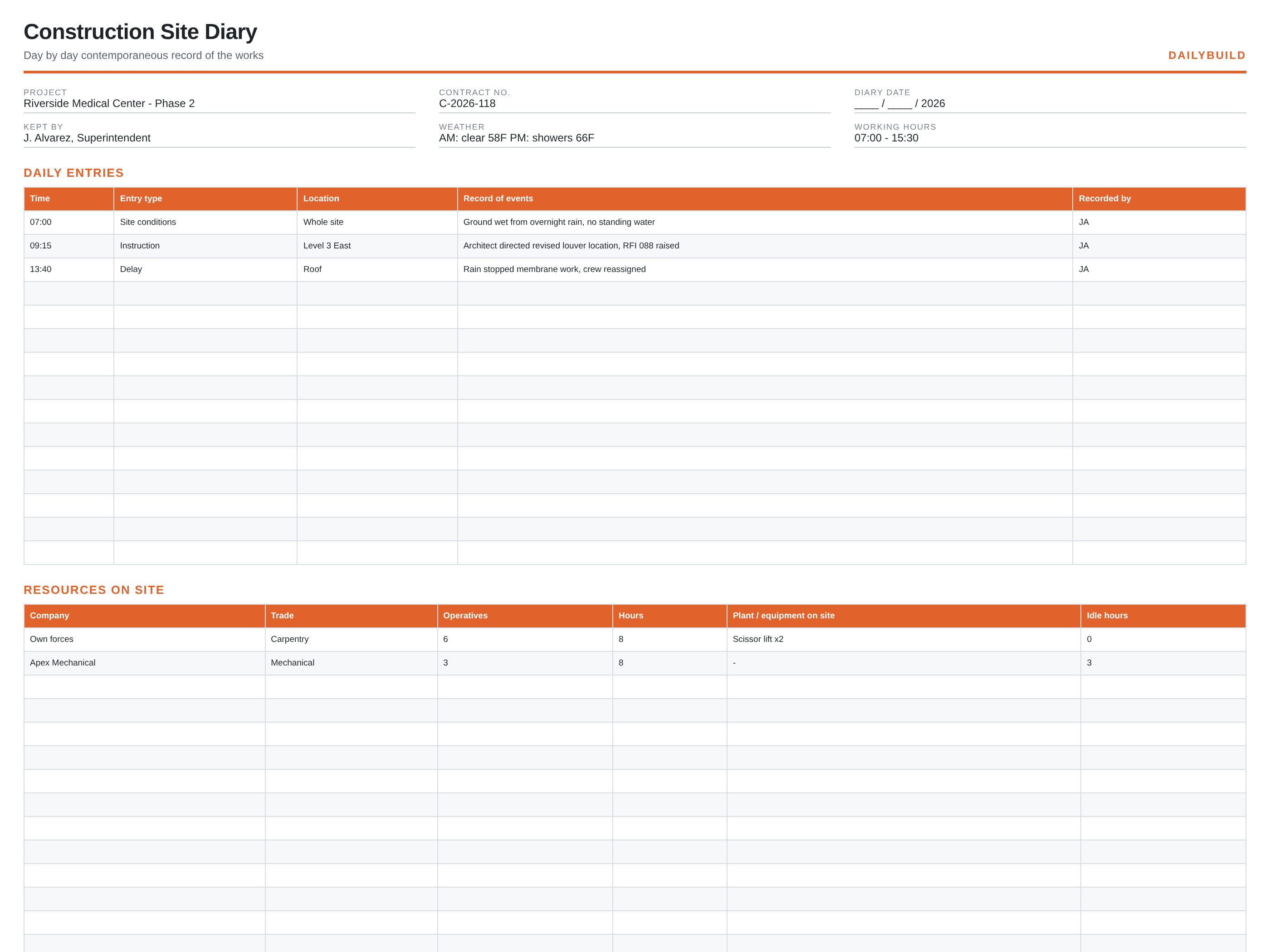
    A contemporaneous day-by-day record of the works: timed entries for events and instructions, labour and plant on site, and a visitor and inspection register that holds up under scrutiny.

    Download Free Excel TemplateDownload Print-Ready PDF
    Create a daily report

    14-day free trial. No credit card required

    Preview Template
    • No signup required
    • Excel and Google Sheets
    • Print-ready PDF included
    • 100% free
    Free construction site diary template preview showing the printable jobsite layout
    DailyBuild_Free_Construction_Site_Diary_Template.xlsx
    Download
    Free bundle

    Get all 30 construction templates

    Editable Excel files plus the paper-to-app checklist. Enter your email for the complete construction bundle.

    Instant download | One email list | Unsubscribe anytime

    What's inside the template

    Built from records that hold up when somebody asks.

    Timed entries

    Time, entry type, location and the record of events in the writer's own words.

    Labour on site

    Company, trade, number of operatives and hours worked.

    Plant and equipment

    What was on site, what ran and what sat idle, with idle hours.

    Visitors and inspections

    Name, company or authority, purpose and outcome.

    Instructions received

    Verbal directions captured the day they are given, before memories differ.

    Delays and stoppages

    The cause, the time lost and who it affected.

    What's included

    Two files, no signup, nothing locked.

    An .xlsx workbook you can edit and a formatted PDF you can print for the truck or the trailer wall.

    Excel workbook (.xlsx)

    Opens in Microsoft Excel, Numbers and Google Sheets. Edit every column and add your own.

    Print-ready PDF

    Landscape, fit to one page width, with sample rows you can clear before printing.

    Sample entries

    A few filled rows so the crew can see the level of detail expected, then blank rows to work in.

    Free to share

    Send it to your subs, your PM, or your whole company. No email address, no watermark.

    The short answer

    Construction Site Diary Template: what it is and how to fill it out.

    A construction site diary is a dated, timed record of what happened on site each day: conditions, instructions received, events and delays, the labour and plant present, and visitors or inspections. It is written as the day unfolds, which is what gives it weight in a claim or dispute.

    Contemporaneous is the whole point

    The value of a site diary comes from being written as events happen. Reconstructed diaries carry little weight because they cannot be tested against the rest of the record. Write the entry the same day, in the order things occurred, and do not tidy it up afterwards.

    Record verbal instructions immediately

    Most disputes over scope start with something said on a walk. A dated, timed diary entry naming who gave the instruction, where, and what was said, is the cheapest protection available. Follow it with an RFI or a confirmation email, and reference the diary entry.

    Facts, not opinions

    Write what was observed: ground wet, no standing water, crew of six on Level 2, membrane work stopped at 13:40 due to rain. Avoid blame or conclusions. Neutral factual entries are far more persuasive than annotated ones, and they age better.


    How to use it

    Four steps, start to finish.

    1. 1

      Open the diary at the start of the shift

      Date, weather, working hours and who is keeping the diary.

    2. 2

      Write entries as the day runs

      Time, type, location and what happened. One event per line.

    3. 3

      Record resources

      Labour by company and trade, plant on site and idle hours.

    4. 4

      Close the day

      Log visitors and inspections with outcomes, then print or file the page unchanged.

    Before and after

    What changes once the record is consistent.

    Without a set format

    • Events recalled at the end of the week
    • Verbal instructions with no record
    • Disputes settled by whoever remembers loudest
    • Idle plant that nobody can evidence
    • Gaps in the record on the days that matter

    With this template

    • A dated entry for every event
    • Instructions captured the day given
    • Labour and plant on the record
    • Visitors and inspections logged
    • A continuous, defensible history

    Excel vs. DailyBuild

    When the spreadsheet stops keeping up.

    The template is free and it works. When the same record has to be captured every day, by several people, from the field, an app does it faster.

    CapabilityExcel TemplateDailyBuild Software
    Timed daily entries
    Labour and plant record
    Visitor and inspection register
    Photos attached to an entry
    Entry timestamped as written
    Weather captured automatically
    Searchable across the whole contract

    What changes when you switch

    • Weather fills itself in for every report
    • Crew hours flow straight into timesheets
    • One tap sends a branded, signed PDF
    Start Free Trial

    Ready to do this from your phone?

    Inside DailyBuild

    Daily reports in DailyBuild

    • Weather fills in automatically
    • Crew sign-off on every report
    • Branded PDF export in one tap
    Start Free Trial

    No credit card required to start your trial

    Frequently asked

    Construction Site Diary Template FAQs

    Free iPhone and Android apps

    Run these logs from your phone

    The DailyBuild app turns the same daily report, timesheet and punch list into something your crew fills out on site - photos, hours and signatures included, with branded PDFs sent automatically.

    Download DailyBuild on the App StoreGet DailyBuild on Google Play
    DailyBuild mobile app Today screen with today's report, time, photo and safety actions

    Keep a record that still makes sense a year from now.

    Download the template free, or let DailyBuild capture the same record on your phone and email the PDF before you leave the jobsite.


