

DailyBuild Construction Daily Reports App
    Free Excel Template · No signup

    Free Construction Meeting Minutes Template

    Capture every attendee, decision, and open action item from your OAC, weekly progress, preconstruction, and subcontractor coordination meetings - with owners, due dates, and a live action item tracker that shows what is overdue.

    Download Free Excel Template
    Create a daily report

    14-day free trial. No credit card required

    Preview Template

    Used by project managers, superintendents, and owners reps on thousands of jobsites.

    • No signup required
    • Microsoft Excel compatible
    • Live action item tracker
    • 100% free
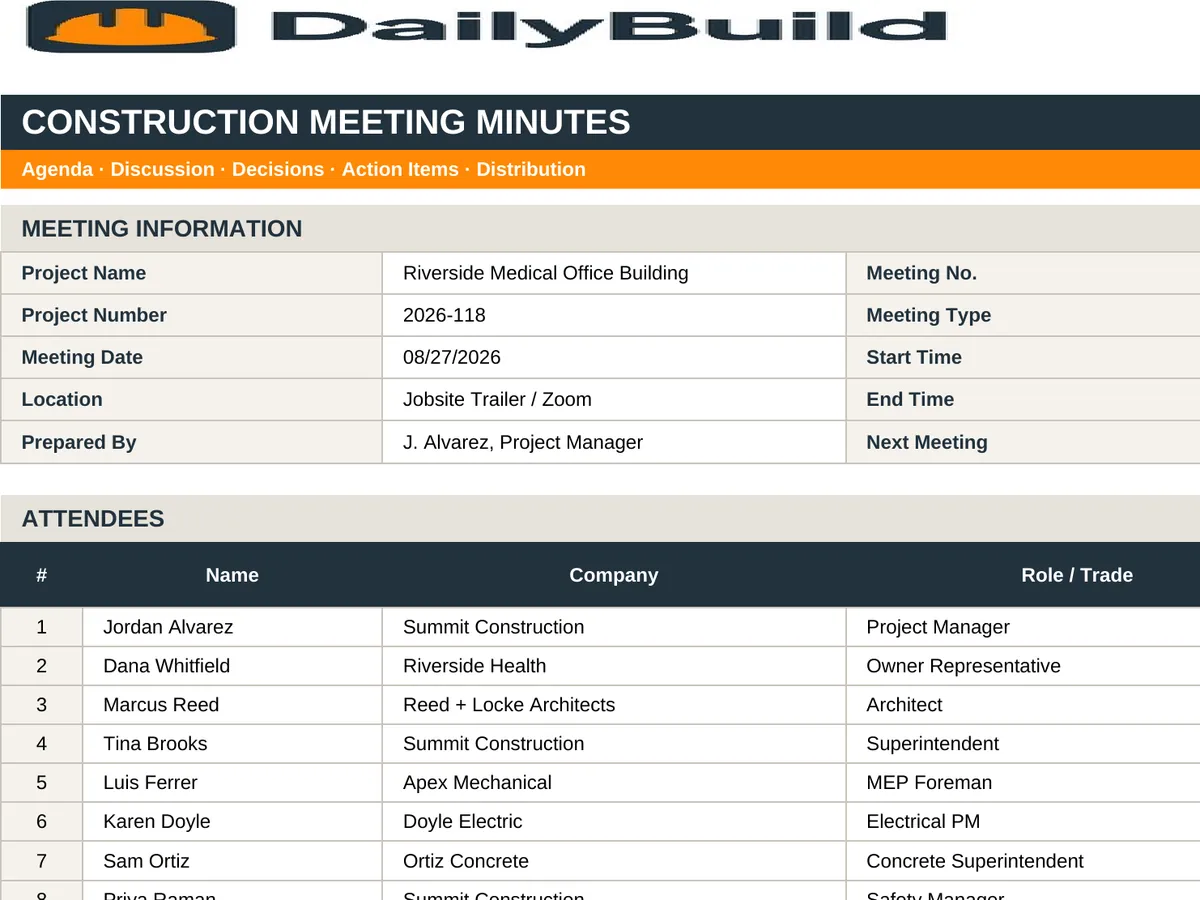
    Free construction meeting minutes Excel template preview - meeting header with project, date, location and type, attendee log, and numbered agenda items with discussion, decisions, action owners and due dates
    DailyBuild_Free_Construction_Meeting_Minutes_Template.xlsx
    Download
    Free bundle

    Get all 30 construction templates

    Editable Excel files plus the paper-to-app checklist. Enter your email for the complete construction bundle.

    Instant download | One email list | Unsubscribe anytime

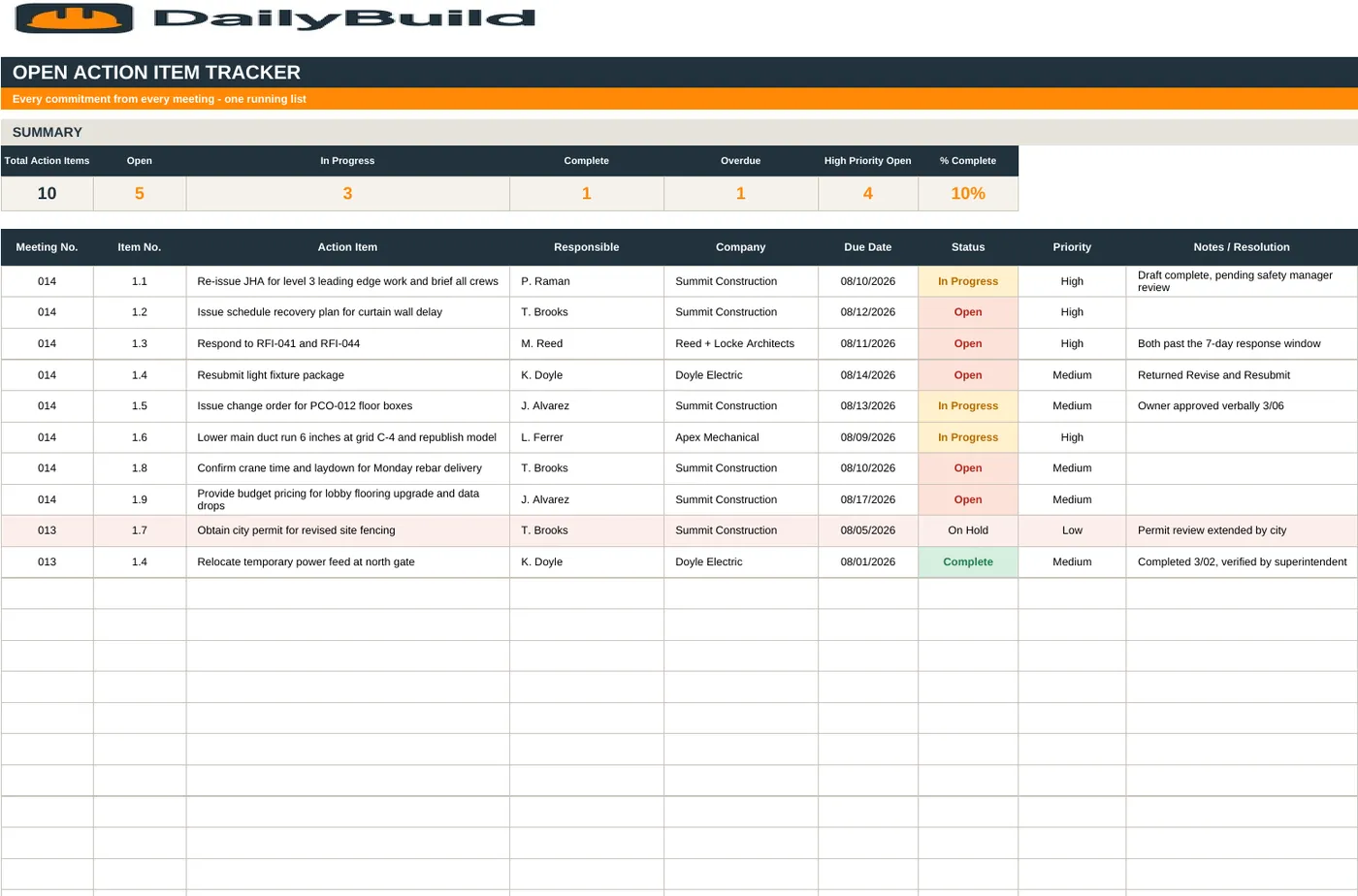
    Action item tracker tab showing open action items with responsible party, due date, priority, status, and days open

    A dedicated action item tracker - every commitment carried forward with an owner, a due date, and a live status.

    What's inside the template

    Everything a professional set of meeting minutes needs.

    Meeting Header

    Project name and number, meeting type, date, time, location, meeting number, prepared by, and distribution list.

    Attendee Log

    Name, company, role, present or absent, email, and phone - so the record of who was in the room is never in dispute.

    Numbered Agenda Items

    Sequential item numbers carried meeting to meeting with discussion notes, decisions, and outcomes.

    Decisions Recorded

    A dedicated decision column so directives are separated from discussion and can be cited later.

    Action Items with Due Dates

    Every action has a responsible party and a due date - the two fields that turn a meeting into progress.

    Action Item Tracker

    All open items in one tab with priority, status, days open, and overdue highlighting.

    Live Meeting Metrics

    Total items, open, closed, overdue, and attendance count calculate automatically.

    Next Meeting Block

    Date, time, and location of the next meeting captured at the bottom of every set of minutes.

    Configurable Dropdowns

    Meeting types, priorities, statuses, and companies are all editable on the Settings tab.

    Print & PDF Ready

    Formatted to fit page width with repeating headers - export a clean PDF for distribution the same hour.

    What's included

    Four tabs. One complete meeting record.

    Built from the way real OAC and weekly progress meetings run. Minutes that stand up months later when someone asks what was agreed.

    Instructions Tab

    A short walkthrough so any PM or engineer can produce consistent minutes.

    Meeting Minutes Tab

    Header, attendee log, and numbered agenda items with discussion, decision, owner, due date, and status.

    Action Item Tracker Tab

    Every open action across the project with priority, owner, due date, days open, and overdue flags.

    Settings Tab

    Meeting types, statuses, priorities, and company list feeding every dropdown.

    26-Line Attendee Log

    Room for the full owner, architect, GC, and subcontractor table.

    Automatic Metrics

    Open, closed, and overdue action counts update themselves as you type.

    Carry-Forward Numbering

    Item numbers persist across meetings so 04-12 always means the same issue.

    100% Free

    No subscription, no email, no credit card required.

    Why minutes matter

    Why meeting minutes are a contract document, not paperwork.

    On most construction projects, the weekly progress meeting and the OAC (owner-architect-contractor) meeting are where scope is clarified, direction is given, and schedule impacts are first raised. Minutes are the written record of all of it. Distributed promptly and left uncontested, they become the accepted version of what happened.

    Decisions belong in their own column

    The most common failure in construction minutes is burying a directive inside a paragraph of discussion. This template splits Discussion from Decision / Direction so that when a change order or delay claim is evaluated later, the directive is quotable on its own line with a date attached.

    An action item without an owner is a wish

    Every action row requires a responsible party and a due date. The Action Item Tracker then rolls all open items into one list with days open and overdue highlighting, so the first five minutes of the next meeting is a review of what actually moved.

    Number items and carry them forward

    Persistent item numbers - meeting number plus item number - let everyone reference the same issue for months. Closed items drop off the tracker; open items stay visible until someone closes them.

    Distribute within 24 hours

    Minutes lose force with time. Send them the same day or the next morning, state a review period, and note that they are considered accurate unless written exception is received. That single sentence at the top of the distribution email is what makes minutes stick.


    How to use the template

    Publish clean minutes in 15 minutes.

    1. 01

      Fill in the meeting header

      Project, meeting number, type, date, time, location, prepared by, and distribution list.

    2. 02

      Log the attendees

      Name, company, role, and present or absent. Include invitees who did not attend - absence matters later.

    3. 03

      Work the agenda in order

      Number each item and record the discussion in plain, factual language. No editorializing.

    4. 04

      Separate the decision

      Write the direction, approval, or resolution in the Decision column so it is quotable on its own.

    5. 05

      Assign every action

      Name a responsible party and a due date for each action item. Set a priority.

    6. 06

      Update the Action Item Tracker

      Carry open items forward, close completed items, and review anything flagged overdue.

    7. 07

      Set the next meeting

      Confirm date, time, and location before anyone leaves the room.

    8. 08

      Distribute the same day

      Export to PDF and send to the distribution list with a stated review period.

    Why contractors love this template

    The difference structured minutes make.

    Typed Notes in a Doc

    • Discussion and decisions mixed together
    • No attendee record
    • Actions with no owner
    • No due dates
    • Nothing carried forward
    • No overdue visibility
    • Inconsistent format each week
    • Impossible to search later

    DailyBuild Meeting Minutes Template

    • Discussion and decision in separate columns
    • 26-line attendee log with companies
    • Responsible party on every action
    • Due dates and priority
    • Persistent item numbering
    • Live overdue action tracker
    • Identical format every meeting
    • Clean PDF export for distribution

    Excel vs. DailyBuild

    When meeting follow-up outgrows the spreadsheet.

    The template is perfect for one project. DailyBuild turns meeting actions into assigned tasks your crews actually see.

    CapabilityExcel TemplateDailyBuild Software
    Meeting Header & Attendees
    Discussion & Decisions
    Action Items with Owners
    Due Dates & Priority
    Assigned Tasks to the Field
    Photos Attached to Items
    Mobile Access on the Jobsite
    Automatic Overdue Notifications
    Linked Daily Reports
    Automated PDF Distribution
    Cloud Storage & Backup
    Searchable Historical Records

    What changes when you switch

    • Weather fills itself in for every report
    • Crew hours flow straight into timesheets
    • One tap sends a branded, signed PDF
    Start Free Trial

    Ready to turn meeting actions into field tasks?

    Inside DailyBuild

    Daily reports in DailyBuild

    • Weather fills in automatically
    • Crew sign-off on every report
    • Branded PDF export in one tap
    Start Free Trial

    No credit card required to start your trial

    Frequently asked

    Construction Meeting Minutes Template FAQs

    Free iPhone and Android apps

    Run these logs from your phone

    The DailyBuild app turns the same daily report, timesheet and punch list into something your crew fills out on site - photos, hours and signatures included, with branded PDFs sent automatically.

    Download DailyBuild on the App StoreGet DailyBuild on Google Play
    DailyBuild mobile app Today screen with today's report, time, photo and safety actions

    Better Meetings. Fewer Surprises.

    Download the free DailyBuild Construction Meeting Minutes Template today or upgrade to DailyBuild to turn every action item into an assigned task your field crews see on their phone.
