DailyBuild Construction Daily Reports App
    Free Excel + PDF · No signup

    Free Jobsite Photo Log Template

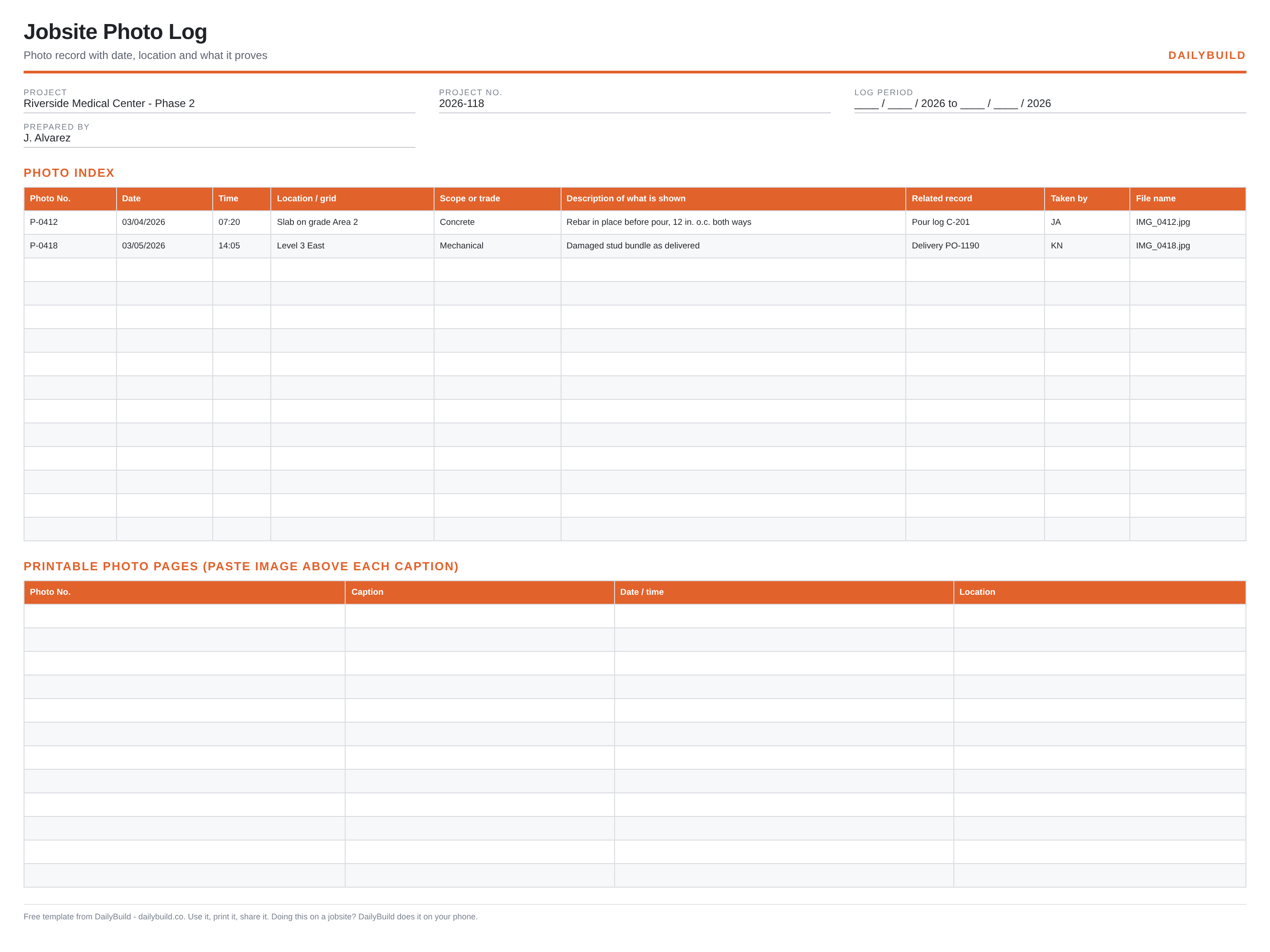
    A photo nobody can place proves nothing. Index every picture with date, time, location, trade, what it shows and the record it supports, then print the photo pages for the file.

    Download Free Excel TemplateDownload Print-Ready PDF
    Organize jobsite photos

    14-day free trial. No credit card required

    Preview Template
    • No signup required
    • Excel and Google Sheets
    • Print-ready PDF included
    • 100% free
    Free jobsite photo log template preview showing the printable jobsite layout
    DailyBuild_Free_Jobsite_Photo_Log_Template.xlsx
    Download
    Free bundle

    Get all 30 construction templates

    Editable Excel files plus the paper-to-app checklist. Enter your email for the complete construction bundle.

    Instant download | One email list | Unsubscribe anytime

    What's inside the template

    Built from records that hold up when somebody asks.

    Photo index

    Photo number, date, time and file name for every image.

    Location and grid

    Where the photo was taken, precisely enough to find again.

    Scope or trade

    Whose work the photo documents.

    What it shows

    One sentence describing the condition in the frame.

    Related record

    The pour log, delivery, RFI or daily report the photo supports.

    Printable photo pages

    A second sheet for pasting images above captions for the binder.

    What's included

    Two files, no signup, nothing locked.

    An .xlsx workbook you can edit and a formatted PDF you can print for the truck or the trailer wall.

    Excel workbook (.xlsx)

    Opens in Microsoft Excel, Numbers and Google Sheets. Edit every column and add your own.

    Print-ready PDF

    Landscape, fit to one page width, with sample rows you can clear before printing.

    Sample entries

    A few filled rows so the crew can see the level of detail expected, then blank rows to work in.

    Free to share

    Send it to your subs, your PM, or your whole company. No email address, no watermark.

    The short answer

    Jobsite Photo Log Template: what it is and how to fill it out.

    A jobsite photo log is an index of construction photos: photo number, date and time, location or grid reference, the trade or scope, a description of what the image shows, the related record, who took it and the file name. The index is what turns a folder of images into usable evidence.

    An unlabelled photo is not evidence

    Six months later, a picture of rebar could be any pour on any level. With a photo number, a date, a grid reference and a line saying what it shows, the same image becomes proof that the mat was placed at 12 inches on centre before concrete arrived.

    Photograph conditions, not just progress

    Progress photos are useful for the owner. The photos that matter later are the ones showing pre-existing damage, an obstruction, a delivery received damaged, or work covered before inspection. Take those on purpose and log them the same day.

    Tie the photo to the record it supports

    The related-record column is what makes the log searchable in a dispute. Pointing a photo at pour log C-201 or delivery PO-1190 means a claim can be assembled from the index rather than by scrolling a camera roll.


    How to use it

    Four steps, start to finish.

    1. 1

      Number photos as you take them

      A simple running number keeps the index and the files aligned.

    2. 2

      Log the essentials the same day

      Date, time, location, trade and one sentence on what the photo shows.

    3. 3

      Link the related record

      The pour, delivery, RFI, inspection or daily report it supports.

    4. 4

      Build the printable pages

      Paste the images above the captions on the second sheet for the project file.

    Before and after

    What changes once the record is consistent.

    Without a set format

    • Thousands of photos nobody can search
    • Images that cannot be placed or dated
    • Evidence lost when a phone is replaced
    • No link between a photo and the record
    • Hours spent scrolling a camera roll

    With this template

    • Every photo numbered and described
    • Location and date on the record
    • Photos linked to pours, deliveries and RFIs
    • A printable photo page for the file
    • Evidence you can find in seconds

    Excel vs. DailyBuild

    When the spreadsheet stops keeping up.

    The template is free and it works. When the same record has to be captured every day, by several people, from the field, an app does it faster.

    CapabilityExcel TemplateDailyBuild Software
    Photo index with descriptions
    Printable photo pages
    Photos stored with the log
    Date, time and location captured automatically
    Photos attached to the daily report
    Markup and annotation on the image
    Searchable across every project

    What changes when you switch

    • Weather fills itself in for every report
    • Crew hours flow straight into timesheets
    • One tap sends a branded, signed PDF
    Start Free Trial

    Ready to do this from your phone?

    Inside DailyBuild

    Photos in DailyBuild

    • Captions on every photo
    • Filed by day and project
    • Inside the daily report
    Start Free Trial

    No credit card required to start your trial

    Frequently asked

    Jobsite Photo Log Template FAQs

    Free iPhone and Android apps

    Run these logs from your phone

    The DailyBuild app turns the same daily report, timesheet and punch list into something your crew fills out on site - photos, hours and signatures included, with branded PDFs sent automatically.

    Download DailyBuild on the App StoreGet DailyBuild on Google Play
    DailyBuild mobile app Today screen with today's report, time, photo and safety actions

    Make every jobsite photo findable.

    Download the template free, or let DailyBuild capture the same record on your phone and email the PDF before you leave the jobsite.


