

DailyBuild Construction Daily Reports App
    Free Excel Template · No signup

    Free Construction Punch List Template for Excel

    Free construction punch list template for Excel that helps you close out every project faster with a professional punch list workbook. Track every item, area, trade, responsible party, priority, due date, status, and aging - with a live dashboard showing open, overdue, and completed work.

    Download Free Excel Template
    Manage punch lists

    14-day free trial. No credit card required

    Preview Template

    Used by GCs and subs to close out thousands of projects.

    • No signup required
    • Microsoft Excel compatible
    • Live dashboard & charts
    • 100% free
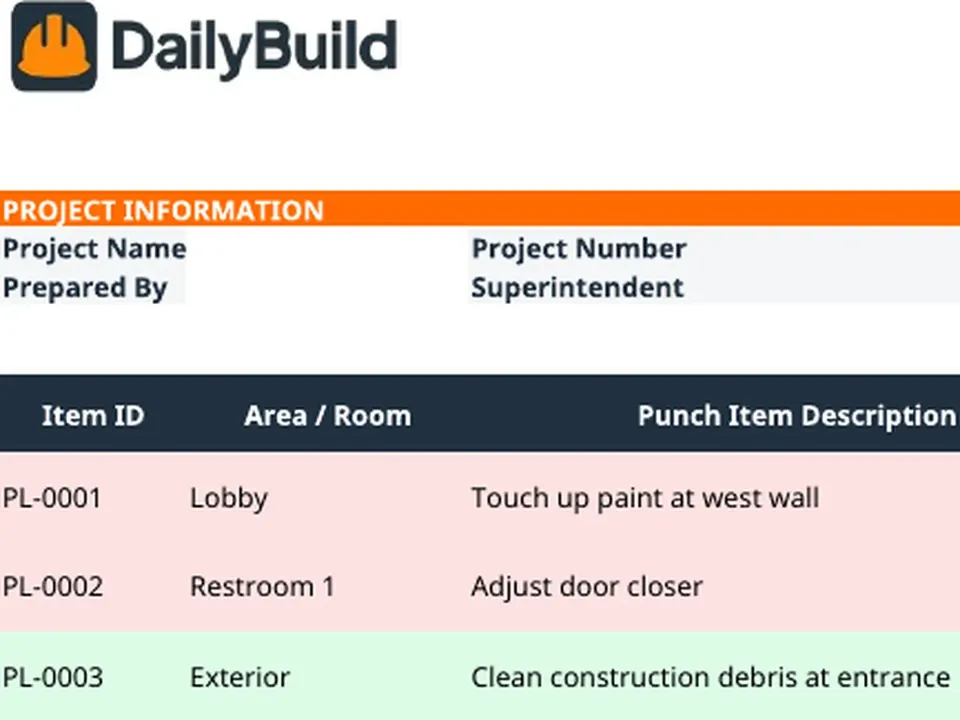
    Free construction punch list Excel template preview - project info, item ID, area, description, category, trade, priority, responsible party, due date, status, days open
    DailyBuild_Free_Punch_List_Template.xlsx
    Download
    Free bundle

    Get all 30 construction templates

    Editable Excel files plus the paper-to-app checklist. Enter your email for the complete construction bundle.

    Instant download | One email list | Unsubscribe anytime

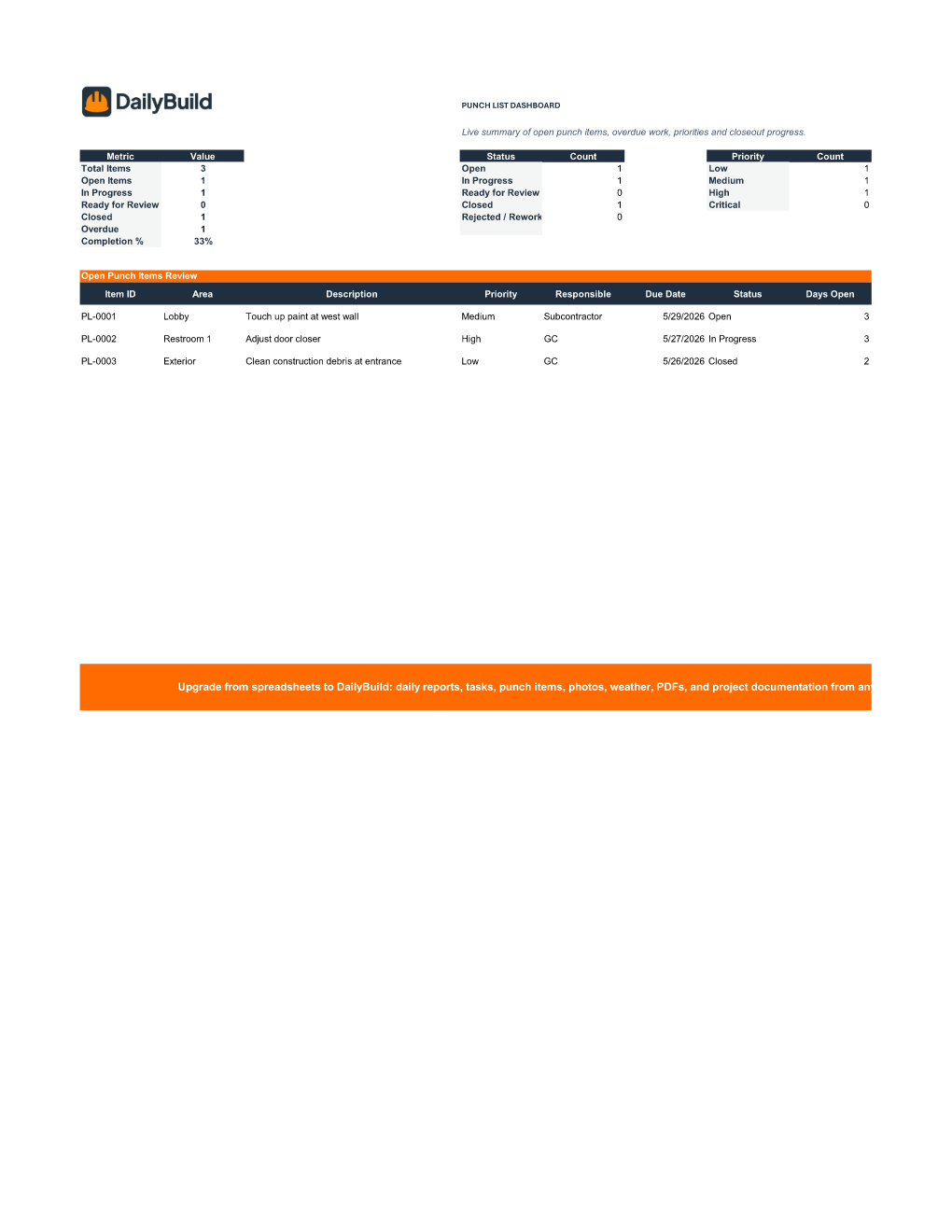
    Punch list dashboard with total items, open, in progress, ready for review, closed, overdue, completion percentage, status counts, priority counts, and open punch items review table

    Live Punch List Dashboard - open items, overdue work, priorities, and closeout progress at a glance.

    What's included

    Everything you need to close out a project.

    Built from real closeout workflows used by GCs, subs, and owners. Defensible documentation, live reporting, nothing extra.

    Project Information Header

    Project name, number, superintendent, client, location, report date, and target completion.

    Professional Punch List

    Item ID, area/room, description, category, trade, priority, responsible party, dates, status, and comments.

    Live Dashboard

    Total, open, in progress, ready for review, closed, overdue, and completion percentage tiles.

    Status Workflow

    Open, In Progress, Ready for Review, Closed, and Rejected/Rework driven by validated dropdowns.

    Priority Workflow

    Low, Medium, High, and Critical priorities feed dashboard counts and charts.

    Auto Aging & Overdue Flags

    Days Open calculates automatically and overdue items surface from the due date.

    Responsibility Assignment

    Assign every item to GC, sub, or vendor with the dropdown - no orphan rows.

    Status & Priority Charts

    Visual bar charts update as items move through the workflow.

    Completion Percentage

    Live closeout completion percentage calculated automatically from the log.

    Configurable Dropdowns

    Category, trade, priority, status, and responsible party driven by the Settings tab.

    Print & PDF Ready

    Formatted for clean PDF export, owner reporting, and printed walk-through packages.

    100% Free

    No subscription, no email, no credit card required.

    Why punch lists matter

    Why contractors track every punch item.

    A construction punch list is the document that stands between substantial completion and final payment. It is the running record of every incomplete, defective, or non-conforming item identified during the closeout walk - and it is the single most important deliverable contractors produce in the last 5% of a project. The contractor with a clean, dated punch list closes out on time and gets paid. The one without it watches retention sit in the owner's bank account for months.

    Accelerating closeout

    Closeout drags when nobody knows what's left. A disciplined punch list tracker with status, responsible party, and due date converts a vague pile of sticky notes into a managed list - so the superintendent knows exactly what to chase Monday morning and the PM knows exactly what stands between the project and final payment.

    Subcontractor accountability

    Most punch items belong to specific trades. Assigning each item to the responsible sub (with category and trade tagged) turns the punch list into a per-sub work list. Subs who close their items fast get paid retention fast; subs who don't see exactly what's holding up their final payment.

    Owner communication

    Sending the owner a weekly punch list summary - total items, open, overdue, completion percentage - sets a tone of control during the most politically sensitive phase of any project. Owners stop asking "when will you be done?" because the answer is already in their inbox.

    Defending retention

    Retention sits in the owner's account until punch is closed. A dated project closeout checklist with documented completion of every item is what gets retention released - and what protects the contractor when an owner tries to hold final payment over a missing item that was actually fixed weeks earlier.

    Defensible closeout records

    Years after closeout, when an owner raises a warranty issue, the punch list is part of the historical record showing what was identified, who fixed it, and when. A consistent punch list spreadsheet is the cheapest warranty insurance policy on any construction project.


    How to use the template

    Build a complete punch list in 15 minutes.

    1. 01

      Enter project information

      Add project name, number, superintendent, client, location, report date, and target completion in the header.

    2. 02

      Customize the Settings tab

      Tweak category, trade, priority, status, and responsible party dropdowns to match your closeout workflow.

    3. 03

      Walk the project and capture items

      Log each punch item with an Item ID, area/room, and a clear description so anyone reading it later knows exactly what to fix.

    4. 04

      Tag category, trade, and priority

      Use dropdowns to keep reporting clean - Painting, Doors, Electrical, MEP, Sitework, and Low/Medium/High/Critical priority.

    5. 05

      Assign responsibility and due date

      Assign every item to GC, subcontractor, or vendor and set a due date so aging and overdue flags drive accountability.

    6. 06

      Update status as work happens

      Move items through Open → In Progress → Ready for Review → Closed, or flag Rejected/Rework when re-work is required.

    7. 07

      Attach photos and comments

      Use the Photo / Link and Comments columns to document the issue, the fix, and any owner sign-off.

    8. 08

      Review the Dashboard

      Check total items, open, overdue, completion percentage, plus status and priority charts before every owner walk.

    Why contractors love this template

    The difference a real punch list makes.

    Typical Free Punch Lists

    • Basic spreadsheet
    • No dashboard
    • No status workflow
    • No priority tracking
    • No aging or overdue flags
    • No reporting

    DailyBuild Punch List

    • Live dashboard
    • Status workflow
    • Priority tracking
    • Responsibility assignment
    • Auto aging & overdue flags
    • Status & priority charts
    • Completion percentage
    • Closeout-ready reporting

    Excel vs. DailyBuild

    When punch list tracking outgrows the spreadsheet.

    The template is perfect for one project and one PM. DailyBuild handles every project, every punch item, from the field.

    CapabilityExcel TemplateDailyBuild Software
    Punch List
    Status Workflow
    Priority Tracking
    Aging & Overdue Flags
    Dashboard Reporting
    Status & Priority Charts
    Photos on Punch Items
    Mobile Field Entry
    Floor Plan Pins
    Owner Sign-off
    Daily Reports
    Tasks
    Automated PDF Reports
    Cloud Storage
    Searchable Historical Records

    What changes when you switch

    • Weather fills itself in for every report
    • Crew hours flow straight into timesheets
    • One tap sends a branded, signed PDF
    Start Free Trial

    Ready to automate punch list tracking?

    Inside DailyBuild

    Tasks and punch lists in DailyBuild

    • Assign each item to a person
    • Attach photos to every item
    • Track items through close-out
    Start Free Trial

    No credit card required to start your trial

    Frequently asked

    Punch List Template FAQs

    Free iPhone and Android apps

    Run these logs from your phone

    The DailyBuild app turns the same daily report, timesheet and punch list into something your crew fills out on site - photos, hours and signatures included, with branded PDFs sent automatically.

    Download DailyBuild on the App StoreGet DailyBuild on Google Play
    DailyBuild mobile app Today screen with today's report, time, photo and safety actions

    Close Out Projects Faster. Get Paid Sooner.

    Download the free DailyBuild Construction Punch List Template today or upgrade to DailyBuild to automate punch lists, daily reports, tasks, photos, and PDF reporting from one place.
