DailyBuild Construction Daily Reports App
    Free Excel + PDF · No signup

    Free Material Delivery Log Template

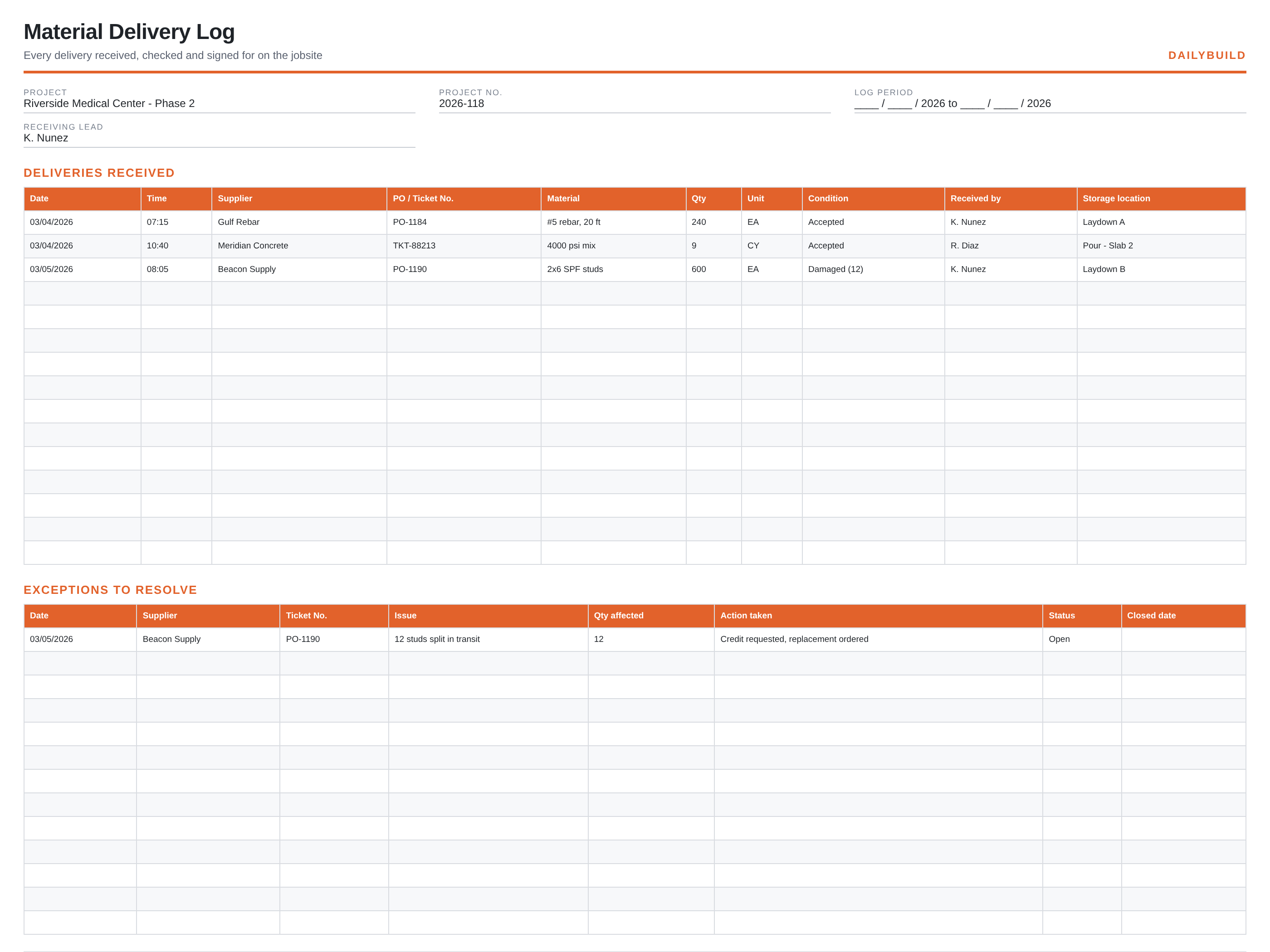
    Record every delivery as it lands: supplier, PO or ticket number, what came, how much, what condition it was in and who signed for it. A second tab tracks shortages and damage until they are credited.

    Download Free Excel TemplateDownload Print-Ready PDF
    Create a daily report

    14-day free trial. No credit card required

    Preview Template
    • No signup required
    • Excel and Google Sheets
    • Print-ready PDF included
    • 100% free
    Free material delivery log template preview showing the printable jobsite layout
    DailyBuild_Free_Material_Delivery_Log_Template.xlsx
    Download
    Free bundle

    Get all 30 construction templates

    Editable Excel files plus the paper-to-app checklist. Enter your email for the complete construction bundle.

    Instant download | One email list | Unsubscribe anytime

    What's inside the template

    Built from records that hold up when somebody asks.

    Delivery entries

    Date, time, supplier, PO or ticket number and material, in the order they arrive.

    Quantity and unit

    What was ordered against what was counted off the truck.

    Condition on arrival

    Accepted, damaged or short, noted before the driver leaves.

    Received by

    The name on the ticket, so there is somebody to ask three weeks later.

    Storage location

    Laydown area or work area, so nobody reorders material that is already on site.

    Shortages and damage tab

    Open exceptions with action taken, status and the date the credit closed.

    What's included

    Two files, no signup, nothing locked.

    An .xlsx workbook you can edit and a formatted PDF you can print for the truck or the trailer wall.

    Excel workbook (.xlsx)

    Opens in Microsoft Excel, Numbers and Google Sheets. Edit every column and add your own.

    Print-ready PDF

    Landscape, fit to one page width, with sample rows you can clear before printing.

    Sample entries

    A few filled rows so the crew can see the level of detail expected, then blank rows to work in.

    Free to share

    Send it to your subs, your PM, or your whole company. No email address, no watermark.

    The short answer

    Material Delivery Log Template: what it is and how to fill it out.

    A material delivery log records each delivery received on a jobsite: date and time, supplier, purchase order or ticket number, material and quantity, condition on arrival, who received it and where it was stored. It is the record used to verify invoices and claim credits for short or damaged loads.

    The log pays for itself on the first short load

    Suppliers invoice from the ticket. If a load arrives short and nobody writes it down before the driver pulls away, the invoice gets paid in full and the shortage becomes your cost. A one-line entry with the ticket number, the count and the word 'short' is what a credit request is built on.

    Count before you sign, note before they leave

    Sign for what you counted, not what the ticket says. Write any exception directly on the driver's copy and in the log, and photograph damaged material where it sits on the truck. Photos plus a dated log entry settle almost every dispute without a phone argument.

    It keeps the same material from being ordered twice

    On a busy site, the fastest way to order material you already have is to store it somewhere nobody recorded. The storage location column takes two seconds and saves the reorder, the restock fee and the space it takes up.


    How to use it

    Four steps, start to finish.

    1. 1

      Meet the truck with the log

      Print the PDF or open the sheet on a phone before the driver drops the gate.

    2. 2

      Count and record

      Ticket number, material, quantity and unit, exactly as counted.

    3. 3

      Note condition and sign

      Accepted, damaged or short, with the count affected and the receiver's name.

    4. 4

      Chase the exceptions

      Move anything short or damaged to the second tab and close it out when the credit lands.

    Before and after

    What changes once the record is consistent.

    Without a set format

    • Invoices paid for material that never arrived
    • Tickets lost in a truck cab
    • No proof a load was damaged on arrival
    • Material reordered because nobody knew it was on site
    • Arguments with suppliers from memory

    With this template

    • Every ticket recorded the day it lands
    • Shortages caught before the invoice
    • A written basis for supplier credits
    • Material findable by storage location
    • A delivery history for the whole job

    Excel vs. DailyBuild

    When the spreadsheet stops keeping up.

    The template is free and it works. When the same record has to be captured every day, by several people, from the field, an app does it faster.

    CapabilityExcel TemplateDailyBuild Software
    Delivery entries
    Shortage and damage tracking
    Photo of the ticket and the load
    Logged from the phone at the gate
    Delivery rolls into the daily report
    Searchable by supplier or PO
    Automatic backup off site

    What changes when you switch

    • Weather fills itself in for every report
    • Crew hours flow straight into timesheets
    • One tap sends a branded, signed PDF
    Start Free Trial

    Ready to do this from your phone?

    Inside DailyBuild

    Daily reports in DailyBuild

    • Weather fills in automatically
    • Crew sign-off on every report
    • Branded PDF export in one tap
    Start Free Trial

    No credit card required to start your trial

    Frequently asked

    Material Delivery Log Template FAQs

    Free iPhone and Android apps

    Run these logs from your phone

    The DailyBuild app turns the same daily report, timesheet and punch list into something your crew fills out on site - photos, hours and signatures included, with branded PDFs sent automatically.

    Download DailyBuild on the App StoreGet DailyBuild on Google Play
    DailyBuild mobile app Today screen with today's report, time, photo and safety actions

    Never pay for a load you did not receive.

    Download the template free, or let DailyBuild capture the same record on your phone and email the PDF before you leave the jobsite.


