

DailyBuild Construction Daily Reports App
    Free Excel Template · No signup

    Free Construction Equipment Log Template for Excel

    Track every piece of equipment on every jobsite - daily usage hours, fuel consumption, operator, project, maintenance, inspections, and downtime - in one professional contractor-ready Excel workbook.

    Download Free Excel Template
    Create a daily report

    14-day free trial. No credit card required

    Preview Template

    Used by contractors to track fleets worth millions.

    • No signup required
    • Microsoft Excel compatible
    • Auto-calculated hours & fuel
    • 100% free
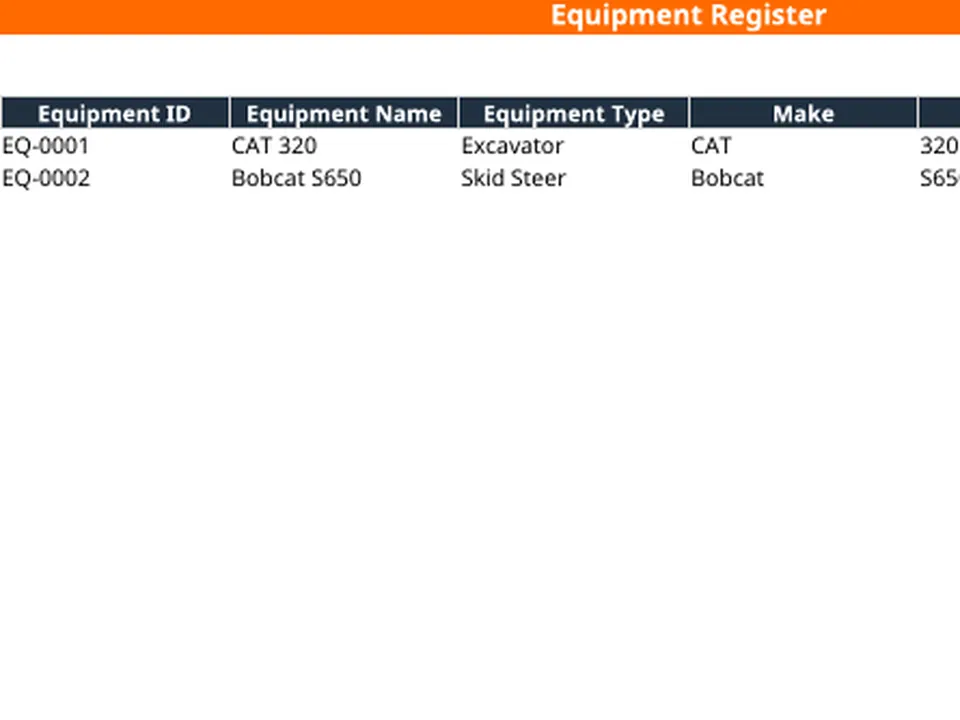
    Free construction equipment log Excel template preview - equipment register, daily usage hours, fuel, operator, project, status, inspection due, maintenance due
    DailyBuild_Free_Equipment_Log_Template.xlsx
    Download
    Free bundle

    Get all 30 construction templates

    Editable Excel files plus the paper-to-app checklist. Enter your email for the complete construction bundle.

    Instant download | One email list | Unsubscribe anytime

    What's inside the template

    Seven tabs. Every detail contractors track on every piece of equipment.

    Equipment Register

    Master list of every machine - ID, make, model, year, serial, asset number, status, assigned project, operator, and current hours.

    Daily Equipment Log

    Daily rows for date, project, equipment, operator, start/end hours, auto-calculated usage hours, fuel added, cost, and work performed.

    Maintenance Log

    Service date, equipment, maintenance type, vendor, description, cost, downtime days, technician, and next service due.

    Inspection Log

    Daily and periodic inspections with inspector, status, deficiencies, corrective actions, and photo references.

    Fuel Log

    Date, equipment, gallons, price per gallon, auto-calculated total cost, vendor, project, and operator for every fill-up.

    Live Dashboard

    Total equipment, active, in use, in maintenance, out of service, utilization rate, and total monthly fuel cost.

    Settings Tab

    Configure equipment types, status options, inspection status, fuel types, and cost codes once - every dropdown updates.

    Auto-Calculated Hours

    Usage hours, fuel cost, and downtime calculate automatically from start/end readings and unit pricing.

    Instructions Tab

    Step-by-step guidance so any foreman, mechanic, or admin can use the workbook on day one.

    What's included

    Everything you need to manage equipment.

    Built from real equipment workflows used by GCs, subs, and self-perform crews. Defensible documentation, clean cost tracking, nothing extra.

    Equipment Register

    Master fleet list with ID, make, model, year, serial, asset number, fuel type, status, and assignment.

    Daily Usage Log

    Date, project, equipment, operator, start/end hours, usage hours, fuel, cost code, and work performed.

    Maintenance Tracking

    Service dates, vendor, description, cost, downtime, technician, and next service due in one tab.

    Inspection Tracking

    Inspector, status, deficiencies, corrective action, and completion for every periodic inspection.

    Fuel Log

    Track every fill-up with gallons, unit price, auto-calculated total cost, vendor, project, and operator.

    Auto-Calculated Usage Hours

    Usage hours and fuel cost calculate automatically - no manual math, no formula errors.

    Live Dashboard

    Total, active, in use, in maintenance, out of service, utilization rate, and total fuel cost roll up automatically.

    Utilization Reporting

    Surface idle equipment, over-utilized assets, and rental return candidates with live utilization metrics.

    Equipment Cost Tracking

    Roll fuel, maintenance, and downtime cost up to the equipment, project, or cost code level.

    Configurable Dropdowns

    Equipment types, status, inspection status, fuel types, and cost codes all driven by the Settings tab.

    Print & PDF Ready

    Formatted for clean PDF export, owner reporting, and printed equipment records.

    100% Free

    No subscription, no email, no credit card required.

    Why equipment logs matter

    Why contractors track every machine, every day.

    A construction equipment log is the single source of truth for every machine on every jobsite. It is how contractors prove how many hours a piece of equipment actually ran, which project it ran on, how much fuel it burned, and when it was serviced. The contractor with a clean equipment log charges the right job, defends rental invoices, and maximizes utilization. The one without it overpays, under-bills, and watches assets quietly fail in the field.

    Accurate job costing

    Equipment is one of the largest line items on any project budget. Without daily usage tracking by project and cost code, equipment cost gets averaged across jobs - and the jobs that ran the machine hardest subsidize the ones that didn't. A disciplined equipment tracking spreadsheet ties every hour to the right job and the right cost code, so job costing finally tells the truth.

    Maximizing utilization

    Idle equipment is one of the most expensive line items in construction. A log with live status - Active, In Use, In Maintenance, Out of Service - surfaces underutilized assets in real time so PMs can reassign, demobilize, or return rentals before another billing cycle hits.

    Preventing breakdowns

    Equipment that misses scheduled service breaks at the worst possible time - usually at 80% completion on a critical-path activity. A consistent equipment maintenance log with next-service- due dates turns reactive emergency repairs into planned downtime that the schedule can absorb.

    Defending rental invoices

    Rental companies bill by the day or by the hour, and their invoices rarely match the field reality. A daily usage log with start and end meter readings is the document that settles invoice disputes - and gets credited days back on every project.

    Fuel cost control

    Fuel is one of the most under-tracked direct costs on a jobsite. A simple fuel log template with gallons, price, and equipment ID creates the data backbone for fuel cost analysis, fuel-theft detection, and accurate per-machine operating cost.

    Inspection compliance

    OSHA, MSHA, and most owner contracts require documented periodic equipment inspections. A dedicated inspection log with inspector, status, deficiencies, and corrective actions is the record that satisfies compliance audits and protects the company in the event of an incident.

    Defensible asset records

    When an asset is sold, refinanced, or insured, the buyer or carrier wants hour history, maintenance records, and inspection documentation. The contractor with a clean equipment log gets fair market value. The one without it gets a low-ball offer.


    How to use the template

    Log a complete equipment day in 2 minutes.

    1. 01

      Customize the Settings tab

      Configure equipment types, statuses, inspection statuses, fuel types, and cost codes to match your company's workflow.

    2. 02

      Build your Equipment Register

      Add every machine with ID, name, type, make, model, year, serial number, asset number, fuel type, and starting hours.

    3. 03

      Log daily usage

      Each day, enter date, project, equipment, operator, start hours, and end hours. Usage hours calculate automatically.

    4. 04

      Track fuel

      Use the Fuel Log to capture every fill-up - gallons, unit price, vendor, project, and operator. Total cost calculates automatically.

    5. 05

      Record maintenance

      Log service date, maintenance type, vendor, description, cost, downtime days, technician, and next service due.

    6. 06

      Document inspections

      Capture inspector, status, deficiencies, corrective actions, and photo references on the Inspection Log.

    7. 07

      Update equipment status

      Set Active, In Use, In Maintenance, or Out of Service on the Equipment Register so the dashboard reflects reality.

    8. 08

      Review the Dashboard

      Check total equipment, active, in use, in maintenance, out of service, utilization, and total fuel cost for stakeholder reporting.

    Template benefits

    The difference a real equipment log makes.

    Without an Equipment Log

    • Untracked machine hours
    • Missed maintenance
    • Idle equipment unnoticed
    • Disputed rental invoices
    • No fuel cost visibility
    • Compliance gaps

    With DailyBuild Equipment Log

    • Every hour tracked to a job
    • Planned maintenance
    • High utilization visibility
    • Defensible rental records
    • Fuel cost control
    • Inspection compliance
    • Accurate equipment cost

    Excel vs. DailyBuild

    When equipment tracking outgrows the spreadsheet.

    The template is perfect for one fleet and one admin. DailyBuild handles every project, every machine, from the field.

    CapabilityExcel TemplateDailyBuild Software
    Equipment Register
    Daily Usage Log
    Maintenance Tracking
    Inspection Tracking
    Fuel Log
    Dashboard Reporting
    Photos on Equipment
    Mobile Field Entry
    GPS Equipment Location
    Daily Reports
    Timesheets
    Tasks
    Automated PDF Reports
    Cloud Storage
    Searchable Historical Records

    What changes when you switch

    • Weather fills itself in for every report
    • Crew hours flow straight into timesheets
    • One tap sends a branded, signed PDF
    Start Free Trial

    Ready to automate equipment tracking?

    Inside DailyBuild

    Daily reports in DailyBuild

    • Weather fills in automatically
    • Crew sign-off on every report
    • Branded PDF export in one tap
    Start Free Trial

    No credit card required to start your trial

    Frequently asked

    Equipment Log Template FAQs

    Free iPhone and Android apps

    Run these logs from your phone

    The DailyBuild app turns the same daily report, timesheet and punch list into something your crew fills out on site - photos, hours and signatures included, with branded PDFs sent automatically.

    Download DailyBuild on the App StoreGet DailyBuild on Google Play
    DailyBuild mobile app Today screen with today's report, time, photo and safety actions

    Track Every Machine. Protect Every Margin.

    Download the free DailyBuild Construction Equipment Log Template today or upgrade to DailyBuild to automate equipment tracking, daily reports, timesheets, photos, and PDF reporting from one place.
