DailyBuild Construction Daily Reports App
    Free Excel + PDF · No signup

    Free Subcontractor Daily Report Template

    A one-page daily record each sub hands to the GC: who was on site, the hours they worked, the work they put in place, what held them up and a signature line that closes the day.

    Download Free Excel TemplateDownload Print-Ready PDF
    Create a daily report

    14-day free trial. No credit card required

    Preview Template
    • No signup required
    • Excel and Google Sheets
    • Print-ready PDF included
    • 100% free
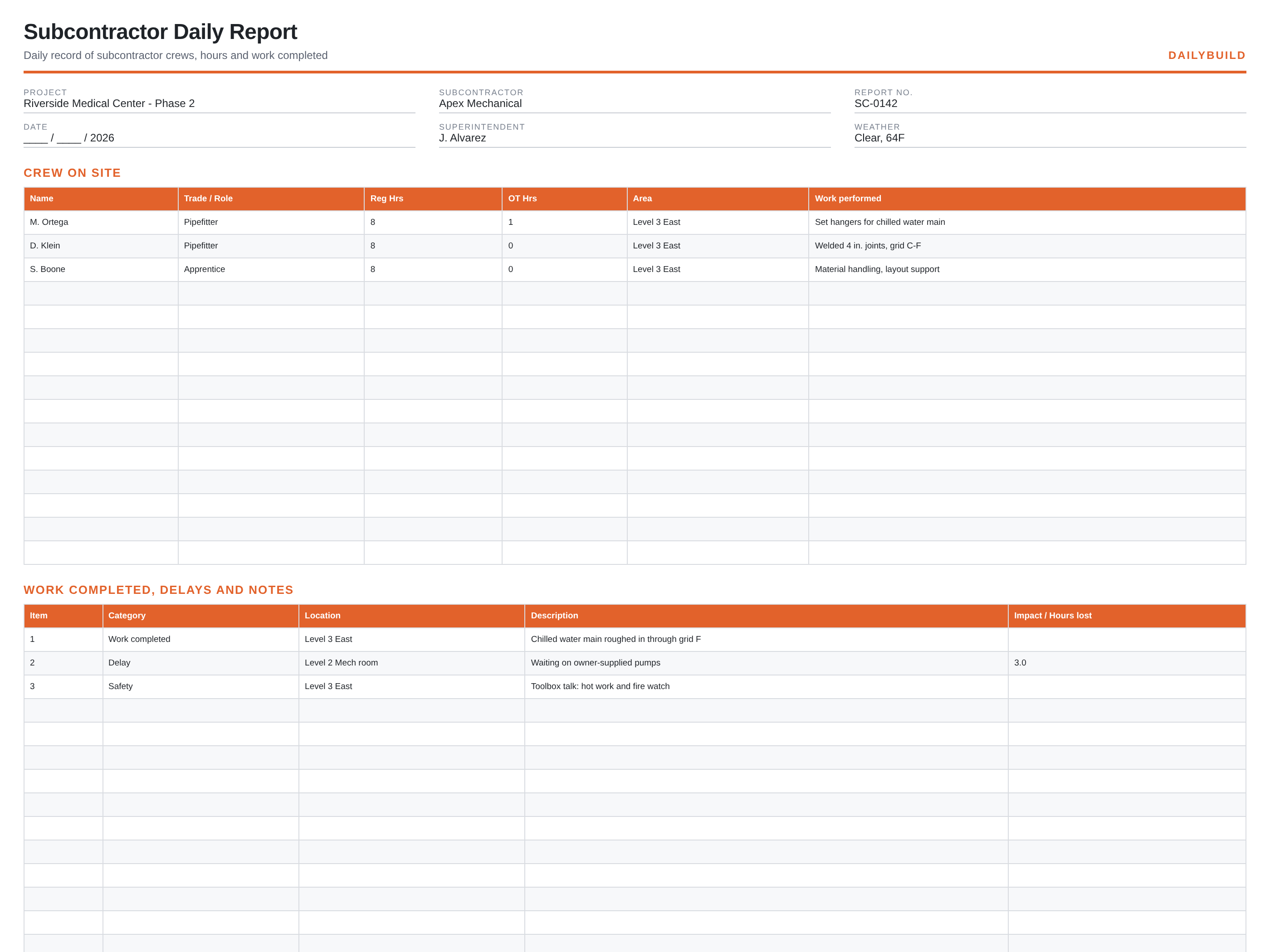
    Free subcontractor daily report template preview showing the printable jobsite layout
    DailyBuild_Free_Subcontractor_Daily_Report_Template.xlsx
    Download
    Free bundle

    Get all 30 construction templates

    Editable Excel files plus the paper-to-app checklist. Enter your email for the complete construction bundle.

    Instant download | One email list | Unsubscribe anytime

    What's inside the template

    Built from records that hold up when somebody asks.

    Crew on site

    Every name, trade, regular hours, overtime and the area they worked in.

    Work performed

    What was actually put in place today, described by location so it can be verified.

    Delays and lost hours

    The hold-up, who owns it and the hours it cost, recorded the day it happened.

    Safety record

    Toolbox talk topic, inspections and anything reported on the sub's scope.

    Sign-off

    Foreman, GC superintendent and optional owner rep, with printed name and date.

    Notes for tomorrow

    What the crew needs cleared before they can work in the morning.

    What's included

    Two files, no signup, nothing locked.

    An .xlsx workbook you can edit and a formatted PDF you can print for the truck or the trailer wall.

    Excel workbook (.xlsx)

    Opens in Microsoft Excel, Numbers and Google Sheets. Edit every column and add your own.

    Print-ready PDF

    Landscape, fit to one page width, with sample rows you can clear before printing.

    Sample entries

    A few filled rows so the crew can see the level of detail expected, then blank rows to work in.

    Free to share

    Send it to your subs, your PM, or your whole company. No email address, no watermark.

    The short answer

    Subcontractor Daily Report Template: what it is and how to fill it out.

    A subcontractor daily report is the trade contractor's record of one day on site: crew names and hours, the work completed by area, delays and their lost hours, and a foreman signature. The GC uses it to verify hours, back-charge delays and build the project daily report.

    Why the GC keeps asking for it

    A subcontractor daily report is the only contemporaneous proof of manpower. When a pay application is questioned, when a delay claim lands, or when a back-charge is disputed, the daily reports are what get pulled. A report written a week later carries far less weight than one signed the day the work happened.

    What separates a useful report from a useless one

    Useless reports say 'continued work'. A useful report names the area, the quantity and the state the work was left in: 'chilled water main roughed in through grid F, hangers set, awaiting insulation'. That sentence lets a PM verify progress without walking the floor, and it is the sentence that protects the sub when the schedule is argued.

    Delays belong on the same page

    Record the delay the day it happens, name the cause and the responsible party, and put a number on the lost hours. Delay entries written after the fact are almost never accepted. A signed same-day entry that says three hours were lost waiting on owner-supplied pumps is a fact in the record.


    How to use it

    Four steps, start to finish.

    1. 1

      Fill in the header

      Project, subcontractor, report number and date. Keep the report numbers sequential so a missing day is obvious.

    2. 2

      List the crew

      Name, trade, regular hours and overtime. This is what the hours on your pay application have to match.

    3. 3

      Describe the work by area

      One line per location. Say what was installed and what state it was left in.

    4. 4

      Log delays and sign

      Note any hold-up with lost hours, then have the foreman and the GC sign before anyone leaves.

    Before and after

    What changes once the record is consistent.

    Without a set format

    • Hours remembered at the end of the week
    • Delay claims with no same-day record
    • GC and sub disagreeing on headcount
    • Reports emailed in five different formats
    • No signature when it matters

    With this template

    • Crew and hours captured daily
    • Delays logged the day they happen
    • One format every sub uses
    • Signed record for pay applications
    • A searchable history of the job

    Excel vs. DailyBuild

    When the spreadsheet stops keeping up.

    The template is free and it works. When the same record has to be captured every day, by several people, from the field, an app does it faster.

    CapabilityExcel TemplateDailyBuild Software
    Crew hours
    Work performed by area
    Delay tracking
    Photos attached to the entry
    Digital signature in the field
    Weather filled in automatically
    PDF emailed to the GC automatically
    Searchable across every project

    What changes when you switch

    • Weather fills itself in for every report
    • Crew hours flow straight into timesheets
    • One tap sends a branded, signed PDF
    Start Free Trial

    Ready to do this from your phone?

    Inside DailyBuild

    Daily reports in DailyBuild

    • Weather fills in automatically
    • Crew sign-off on every report
    • Branded PDF export in one tap
    Start Free Trial

    No credit card required to start your trial

    Frequently asked

    Subcontractor Daily Report Template FAQs

    Free iPhone and Android apps

    Run these logs from your phone

    The DailyBuild app turns the same daily report, timesheet and punch list into something your crew fills out on site - photos, hours and signatures included, with branded PDFs sent automatically.

    Download DailyBuild on the App StoreGet DailyBuild on Google Play
    DailyBuild mobile app Today screen with today's report, time, photo and safety actions

    Hand in the same report every day, without the paperwork.

    Download the template free, or let DailyBuild capture the same record on your phone and email the PDF before you leave the jobsite.


