

DailyBuild Construction Daily Reports App
    Free Excel Template · No signup

    Free Construction Schedule & Gantt Chart Template

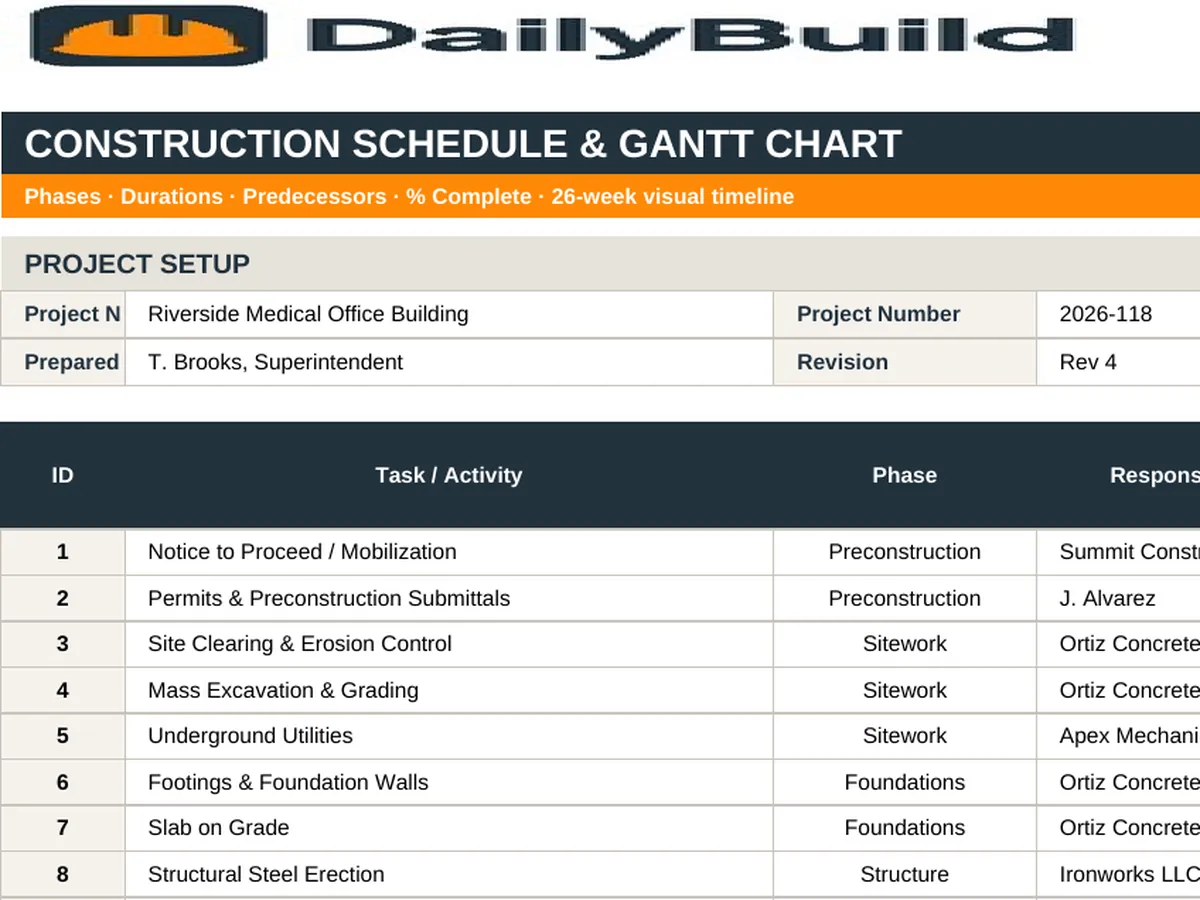
    Lay out every phase and task, enter a start date and duration, and watch the 26-week Gantt bars draw themselves - complete with percent complete, responsible trade, float, and a project dashboard that flags what is behind.

    Download Free Excel Template
    Plan your schedule

    14-day free trial. No credit card required

    Preview Template

    Used by superintendents, project managers, and estimators to plan jobs of every size.

    • No signup required
    • Automatic Gantt bars
    • 26-week timeline
    • 100% free
    Free construction schedule Gantt chart Excel template preview - phases and tasks with start and finish dates, duration, percent complete, responsible trade, and color-coded weekly Gantt bars
    DailyBuild_Free_Construction_Schedule_Gantt_Template.xlsx
    Download
    Free bundle

    Get all 30 construction templates

    Editable Excel files plus the paper-to-app checklist. Enter your email for the complete construction bundle.

    Instant download | One email list | Unsubscribe anytime

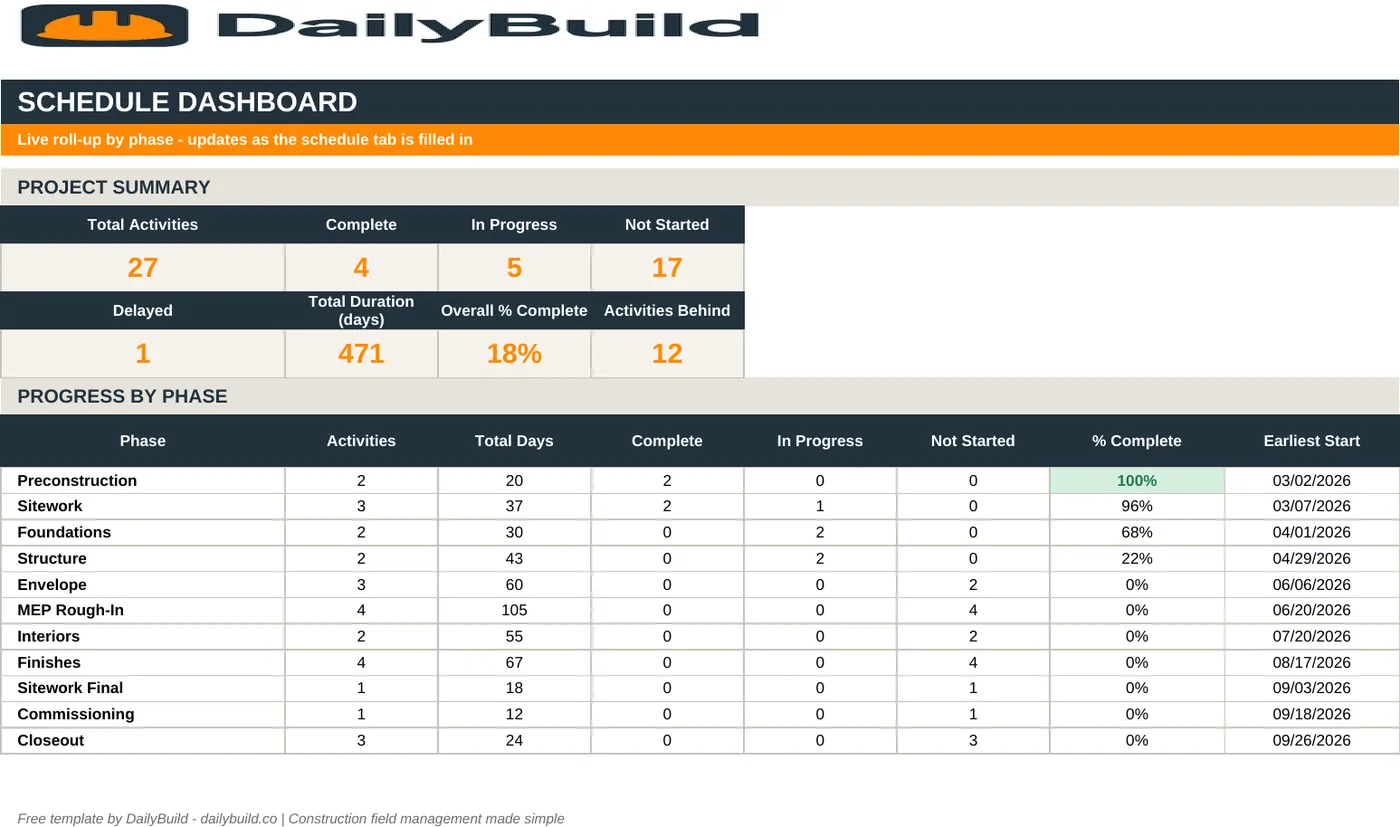
    Construction schedule dashboard showing total tasks, complete, in progress, not started, behind schedule, and overall percent complete

    A live schedule dashboard - overall percent complete, tasks behind schedule, and phase-by-phase progress calculated for you.

    What's inside the template

    A real construction schedule, not a generic project planner.

    Phase & Task Structure

    Group tasks under phases - preconstruction, sitework, foundations, structure, envelope, MEP, finishes, closeout.

    Automatic Gantt Bars

    Enter start and finish and the weekly bars draw themselves across a 26-week timeline.

    26-Week Timeline

    Half a year of week-ending columns with the current week highlighted.

    Duration & Work Days

    Durations calculate in calendar and work days so you can sanity-check the plan.

    Percent Complete

    Track progress per task; phase and project rollups update automatically.

    Responsible Trade

    Assign the crew or subcontractor accountable for every line.

    Status & Predecessors

    Not Started, In Progress, Complete, Delayed - plus a predecessor column for simple dependencies.

    Project Dashboard

    Overall percent complete, tasks behind schedule, upcoming starts, and phase progress in one view.

    Configurable Settings

    Edit phases, trades, and statuses to match how your company sequences work.

    Print & PDF Ready

    Landscape, fit-to-width, frozen panes - a schedule you can post in the trailer.

    What's included

    Four tabs. One complete construction schedule.

    Everything you need to plan and communicate a job schedule without buying scheduling software.

    Instructions Tab

    How to set the project start date, add phases, and read the Gantt.

    Schedule & Gantt Tab

    Task list on the left, 26 weeks of automatic Gantt bars on the right.

    Dashboard Tab

    Overall progress, behind-schedule count, and phase-by-phase completion.

    Settings Tab

    Phase names, trades, and status options feeding the dropdowns.

    Automatic Durations

    Duration and work days calculate from your start and finish dates.

    Pre-Filled Example Schedule

    A realistic commercial build sequence you can edit or clear in seconds.

    Current Week Highlight

    Today's week column shades itself so the plan-versus-actual read is instant.

    100% Free

    No subscription, no email, no credit card required.

    Why schedule in Excel

    A schedule the whole crew will actually read.

    Most small and mid-size contractors do not need critical-path scheduling software. They need a clear, current Gantt chart showing which phase starts when, who owns it, and what is behind. That is exactly what this template produces - and every subcontractor already knows how to open it.

    Phases first, tasks second

    Build the schedule top-down. Lay out the major phases - sitework, foundations, structure, envelope, rough-in, finishes, closeout - then break each into the handful of tasks that actually drive the phase. A schedule with 40 meaningful lines gets used; one with 400 gets ignored.

    Durations in work days, not hope

    The template calculates both calendar days and work days from your start and finish dates. If a phase reads 10 work days and the crew size cannot support it, you find out during planning instead of during the week it slips.

    Percent complete makes the schedule honest

    Update percent complete weekly. The dashboard rolls it up into overall project progress and counts every task flagged Delayed, so the conversation in the progress meeting starts with a number rather than an opinion.

    Post it, don't file it

    The Gantt tab is formatted landscape and fit-to-width for a clean PDF. Print it for the trailer wall, attach it to the weekly minutes, and send it to the owner. A schedule nobody sees cannot coordinate anything.


    How to use the template

    Build a working schedule in under an hour.

    1. 01

      Set the project start date

      Enter the project start on the schedule tab - the 26-week timeline headers generate from it.

    2. 02

      List your phases

      Use the Phase dropdown to group work. Edit the phase list on the Settings tab to match your sequence.

    3. 03

      Add tasks under each phase

      One line per meaningful activity. Keep it to the tasks that actually drive the sequence.

    4. 04

      Enter start and finish dates

      Duration and work days calculate automatically, and the Gantt bars draw themselves.

    5. 05

      Assign the responsible trade

      Name the crew or subcontractor accountable for each line so coordination calls go to the right person.

    6. 06

      Add predecessors where they matter

      Reference the task number that must finish first to make the sequence logic explicit.

    7. 07

      Update percent complete weekly

      Update progress and status every week - the dashboard recalculates instantly.

    8. 08

      Publish the PDF

      Export the Gantt to PDF for the trailer wall, the owner, and the weekly meeting packet.

    Why contractors love this template

    The difference a real Gantt makes.

    A Task List in a Notebook

    • No visual timeline
    • No phase structure
    • Durations guessed
    • No progress tracking
    • Nothing flags what's behind
    • No trade accountability
    • Nothing to hand the owner
    • Rewritten from scratch each month

    DailyBuild Schedule Template

    • Automatic 26-week Gantt chart
    • Phase-grouped task structure
    • Calendar and work day durations
    • Percent complete per task and phase
    • Behind-schedule count on the dashboard
    • Responsible trade on every line
    • Print and PDF ready in landscape
    • Reusable on every project

    Excel vs. DailyBuild

    When the schedule needs to reach the field.

    The template plans the work. DailyBuild connects that plan to the daily reports, tasks, and photos coming off the jobsite.

    CapabilityExcel TemplateDailyBuild Software
    Phases & Tasks
    Gantt Timeline
    Percent Complete
    Responsible Trade
    Field Progress Updates
    Tasks Assigned to Crews
    Photos Tied to Progress
    Mobile Access on the Jobsite
    Linked Daily Reports
    Automated PDF Reports
    Cloud Storage & Backup
    Searchable Historical Records

    What changes when you switch

    • Weather fills itself in for every report
    • Crew hours flow straight into timesheets
    • One tap sends a branded, signed PDF
    Start Free Trial

    Ready to connect the schedule to the field?

    Inside DailyBuild

    Schedules in DailyBuild

    • Gantt view of every task
    • Dates shared with the whole crew
    • Schedule filed to the project
    Start Free Trial

    No credit card required to start your trial

    Frequently asked

    Construction Schedule & Gantt Template FAQs

    Free iPhone and Android apps

    Run these logs from your phone

    The DailyBuild app turns the same daily report, timesheet and punch list into something your crew fills out on site - photos, hours and signatures included, with branded PDFs sent automatically.

    Download DailyBuild on the App StoreGet DailyBuild on Google Play
    DailyBuild mobile app Today screen with today's report, time, photo and safety actions

    Plan the Sequence. Hold the Date.

    Download the free DailyBuild Construction Schedule & Gantt Chart Template today or upgrade to DailyBuild to connect the schedule to daily reports, tasks, and photos from the field.
