

DailyBuild Construction Daily Reports App
    Free Excel Template · No signup

    Free Toolbox Talk Template + 52 Topics

    Run a real tailgate safety meeting in ten minutes: pick the topic, work the discussion points, review the hazards on today's work, and capture every crew member's signature - with a full year of topics already written for you.

    Download Free Excel TemplateDownload Print-Ready PDF
    Record a toolbox talk

    14-day free trial. No credit card required

    Preview Template

    Used by foremen and safety managers to document weekly safety meetings.

    • No signup required
    • 52-week topic library included
    • Crew sign-in sheet
    • 100% free
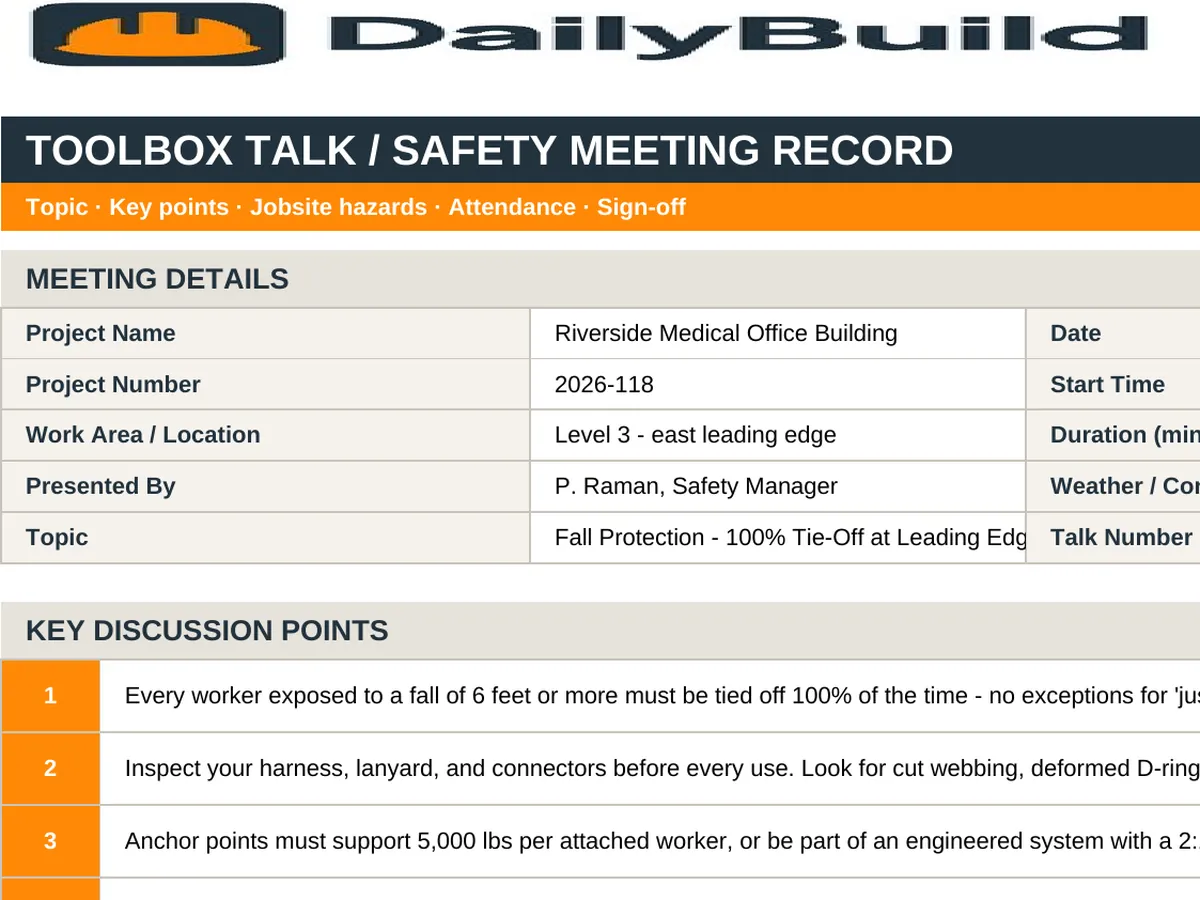
    Free toolbox talk Excel template preview - meeting header with project, date, topic and presenter, discussion points, hazards reviewed on today's work, and crew attendance sign-in rows
    DailyBuild_Free_Toolbox_Talk_Template.xlsx
    Download
    Free bundle

    Get all 11 safety templates

    Editable Excel files plus the paper-to-app checklist. Enter your email for the complete safety bundle.

    Instant download | One email list | Unsubscribe anytime

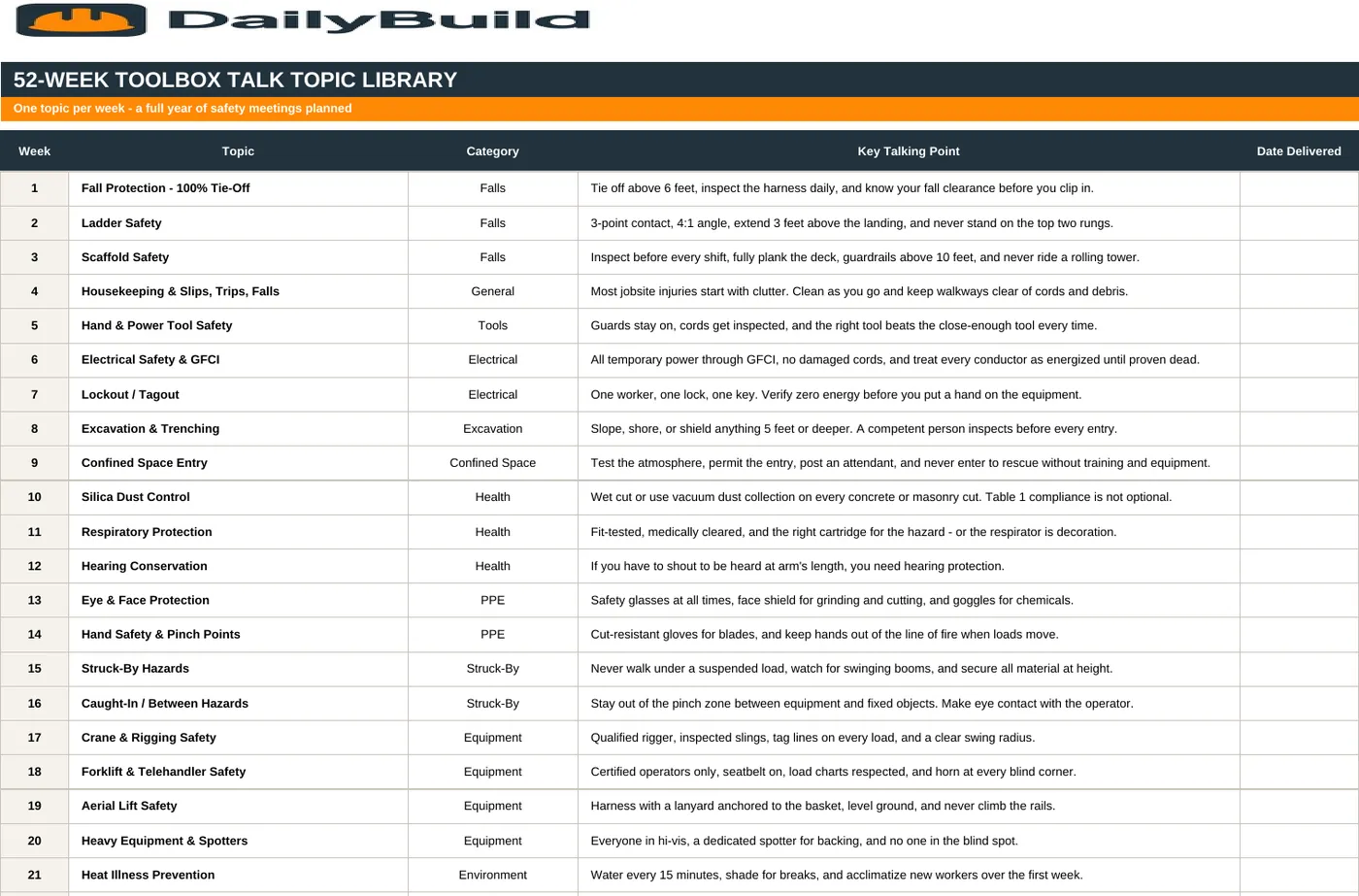
    52-week toolbox talk topic library listing a safety topic, category, and key talking point for every week of the year

    A 52-week topic library - falls, electrical, silica, heat, excavation, rigging, and more, one topic per week with the key talking point written out.

    What's inside the template

    Everything the tailgate meeting record needs.

    Meeting Header

    Project, date, time, location, topic, presenter, and weather conditions.

    Discussion Points

    Numbered talking points so the meeting follows a structure instead of drifting.

    Hazards Reviewed Today

    Tie the topic to the actual hazards on today's scope of work - the step most crews skip.

    PPE Required

    State the PPE for the shift so there is no argument at the gate.

    26-Line Attendance Sign-In

    Print name, company, trade, and signature for every worker at the meeting.

    Questions & Concerns Raised

    Capture what the crew brings up and what you committed to fix.

    52-Week Topic Library

    A full year of topics with category and key talking point - never scramble for a subject again.

    Training Log

    Running record of dates, topics, presenters, and attendance counts for OSHA documentation.

    Attendance Totals

    Total attendees calculates automatically at supervisor sign-off.

    Print & PDF Ready

    One clean page per meeting - print a stack for the truck or export to PDF for the file.

    What's included

    Four tabs. A full year of safety meetings.

    Built so a foreman can run a credible ten-minute safety meeting and leave behind a record that satisfies OSHA and the GC.

    Instructions Tab

    How to pick a topic, run the talk, and file the record.

    Toolbox Talk Tab

    The meeting form: header, discussion points, hazards, PPE, sign-in, and sign-off.

    52-Week Topic Library Tab

    One topic per week with category and key talking point, from fall protection to cold stress.

    Training Log Tab

    Every meeting logged with date, topic, presenter, and attendance count.

    26 Signature Lines

    Enough room for a full crew plus visiting subs.

    OSHA-Aligned Content

    Topics cover the focus four hazards and the citations that actually show up.

    Reusable Every Week

    Save a copy per meeting - the topic library keeps you a full year ahead.

    100% Free

    No subscription, no email, no credit card required.

    Why toolbox talks matter

    The ten minutes that prevent the incident.

    A toolbox talk - also called a tailgate meeting or safety talk - is a short, focused safety discussion held with the crew before work begins. Ten minutes, one topic, tied to the hazards actually present on today's scope. It is the most consistently effective safety habit in construction, and the easiest one to let slide.

    Tie the topic to today's work

    A generic talk read off a sheet changes nothing. The Hazards Reviewed section exists to force the connection: if the crew is setting steel today, the fall protection topic gets discussed in terms of the actual connection points on this building. That is the difference between a meeting and a formality.

    Attendance is the documentation

    OSHA's training requirements are met by evidence, not intent. A signed attendance sheet with date, topic, presenter, and every worker's signature is the record that proves the crew was trained on that hazard on that day. The Training Log tab keeps the running history in one place.

    Never scramble for a topic

    The 52-week library covers falls, ladders, scaffolds, electrical, lockout/tagout, excavation, confined space, silica, respiratory protection, heat, cold, rigging, forklifts, aerial lifts, fire, housekeeping, and more - each with a key talking point you can lead with. Work it in order or pick the topic that fits the week's scope.

    Close the loop on concerns

    When a worker raises a concern in the meeting, write it down and record what you committed to do. Crews stop speaking up the second they conclude nothing happens when they do.


    How to use the template

    Run a documented safety meeting in ten minutes.

    1. 01

      Pick this week's topic

      Use the 52-Week Topic Library or choose the topic that matches this week's scope of work.

    2. 02

      Fill in the meeting header

      Project, date, time, location, topic, presenter, and weather conditions.

    3. 03

      Work the discussion points

      Cover each numbered point in plain language. Ask questions instead of lecturing.

    4. 04

      Connect it to today's hazards

      List the specific hazards on today's scope so the topic lands on real work.

    5. 05

      State the PPE required

      Spell out what the crew wears for the shift - no ambiguity at the gate.

    6. 06

      Capture questions and concerns

      Write down what the crew raises and what you will do about it.

    7. 07

      Sign everyone in

      Every attendee prints their name, company, trade, and signs. Total attendees calculates automatically.

    8. 08

      Log it and file it

      Add the meeting to the Training Log tab and file the PDF in the project safety records.

    Why contractors love this template

    The difference a documented talk makes.

    A Verbal Huddle

    • No written topic
    • No record it happened
    • No attendance signatures
    • Same topic repeated for months
    • Not tied to today's hazards
    • Concerns raised and forgotten
    • Nothing to show an inspector
    • No training history

    DailyBuild Toolbox Talk Template

    • Structured discussion points
    • Dated, signed meeting record
    • 26-line crew sign-in sheet
    • 52 topics planned for the year
    • Hazards tied to today's scope
    • Concerns and follow-up captured
    • Print and PDF ready for inspectors
    • Running training log by date

    Excel vs. DailyBuild

    When safety meetings need to live with the crew.

    The template documents the meeting. DailyBuild puts it on the phone in the foreman's pocket alongside the daily report.

    CapabilityExcel TemplateDailyBuild Software
    Topic & Discussion Points
    Hazards Reviewed
    Crew Attendance
    Supervisor Sign-Off
    Digital Crew E-Signatures
    Photos from the Meeting
    Mobile Field Completion
    Linked Daily Reports
    Tasks for Raised Concerns
    Automated PDF Reports
    Cloud Storage & Backup
    Searchable Training History

    What changes when you switch

    • Weather fills itself in for every report
    • Crew hours flow straight into timesheets
    • One tap sends a branded, signed PDF
    Start Free Trial

    Ready to run toolbox talks from the jobsite?

    Inside DailyBuild

    The DailyBuild safety hub

    • E-signatures from every worker
    • Attendance captured on site
    • Records filed to the project
    Start Free Trial

    No credit card required to start your trial

    Frequently asked

    Toolbox Talk Template FAQs

    New: Daily AI

    Or let Daily AI write the talk for you

    In the DailyBuild app, Daily AI drafts a complete toolbox talk from your own safety documents and files it ready for the morning huddle. It also answers questions from your plans and specs with the file and page cited.

    Free iPhone and Android apps

    Run these logs from your phone

    The DailyBuild app turns the same daily report, timesheet and punch list into something your crew fills out on site - photos, hours and signatures included, with branded PDFs sent automatically.

    Download DailyBuild on the App StoreGet DailyBuild on Google Play
    DailyBuild mobile app Today screen with today's report, time, photo and safety actions

    Ten Minutes a Week. Everyone Home Safe.

    Download the free DailyBuild Toolbox Talk Template today or upgrade to DailyBuild to run safety meetings, JHAs, daily reports, and photo documentation from one mobile app.
