

DailyBuild Construction Daily Reports App
    Free Excel Template · No signup

    Free OSHA Construction Safety Inspection Template - Excel Checklist with PDF Report Export

    Free construction safety inspection template for Excel that runs a structured jobsite safety inspection in minutes. Review PPE, fall protection, electrical, fire safety, excavation, environmental, and emergency items with OSHA 1926 references, corrective actions, a live safety score, and a print-ready PDF inspection report.

    Download Free Excel TemplateDownload Print-Ready PDF
    Run a safety inspection

    14-day free trial. No credit card required

    Preview Template

    Used by safety managers and superintendents on thousands of jobsites.

    • No signup required
    • Microsoft Excel compatible
    • OSHA-referenced checklist
    • 100% free

    Quick answer

    What should a construction safety inspection checklist cover?

    A construction safety inspection should help a competent person identify current hazards, document what was observed, assign corrective action, and verify that each issue was closed.

    • PPE, fall protection, ladders, scaffolds, and walking surfaces
    • Electrical, fire prevention, housekeeping, and material storage
    • Excavation, equipment, rigging, hazard communication, and emergency access
    • Pass, fail, or not-applicable status with hazard priority
    • Corrective action, responsible person, due date, completion, and sign-off

    A checklist supports a safety program but does not by itself establish compliance. Site conditions, applicable standards, and competent-person responsibilities still control.

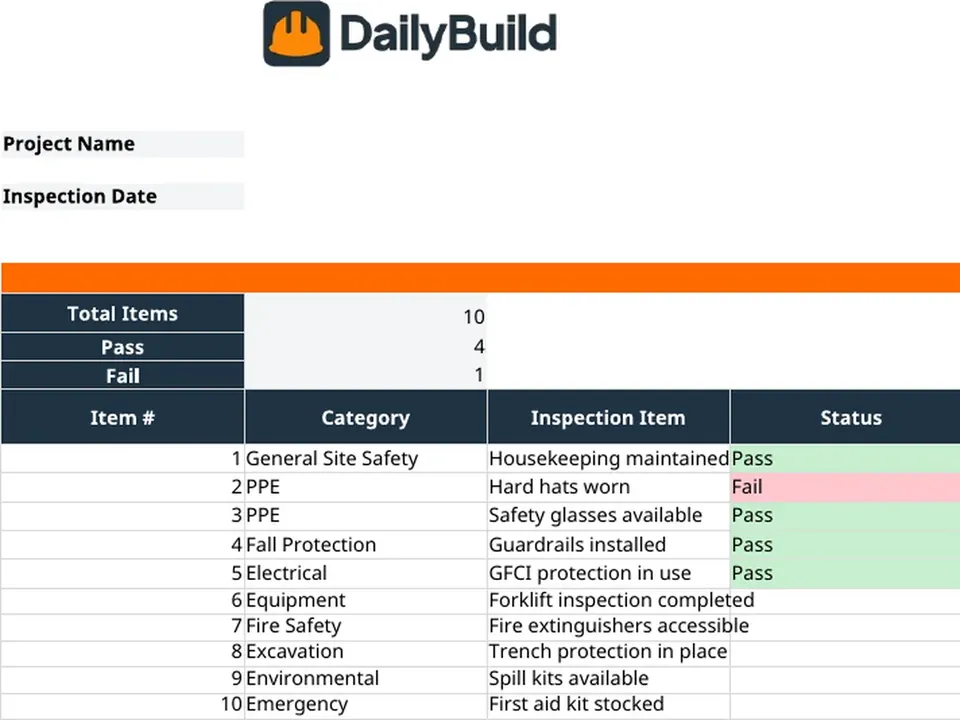
    Free construction safety inspection Excel template preview - project info, safety dashboard with pass/fail and safety score, inspection checklist with category, hazard level, corrective action, assigned to, due date, and OSHA reference
    DailyBuild_Safety_Inspection_Template_PRO.xlsx
    Download
    Free bundle

    Get all 11 safety templates

    Editable Excel files plus the paper-to-app checklist. Enter your email for the complete safety bundle.

    Instant download | One email list | Unsubscribe anytime

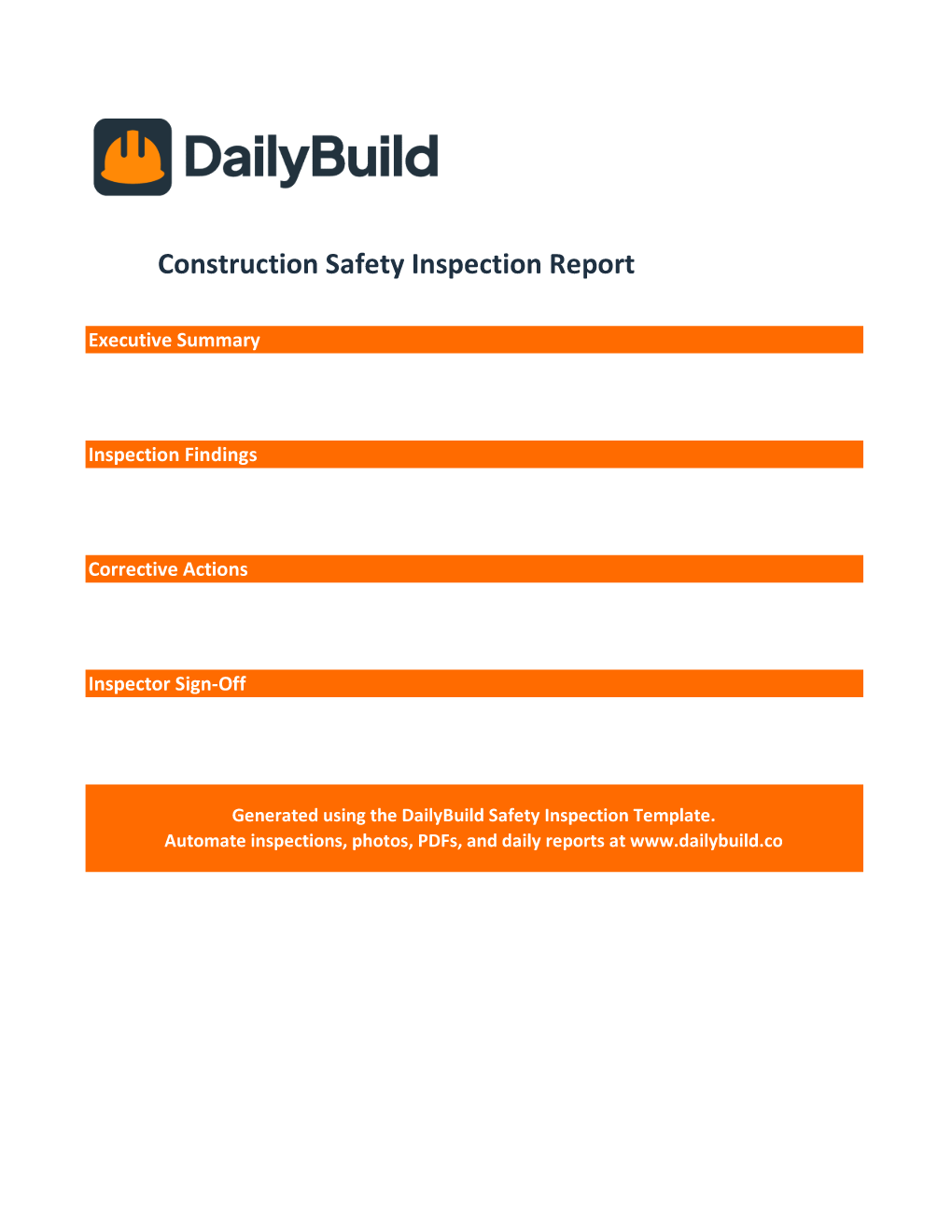
    Construction Safety Inspection Report - executive summary, inspection findings, corrective actions, and inspector sign-off

    Built-in Safety Inspection Report - executive summary, findings, corrective actions, and inspector sign-off ready to send.

    What's inside the template

    Every detail safety managers track on a jobsite inspection.

    Project Information

    Project name, number, address, inspection date, inspector, and inspection type in one clean header.

    Safety Dashboard

    Total items, pass, fail, and live safety score percentage update automatically as you complete the checklist.

    OSHA-Referenced Checklist

    Pre-loaded inspection items across PPE, fall protection, electrical, fire safety, excavation, environmental, and emergency - each tied to an OSHA 1926 reference.

    Pass / Fail Status

    Validated dropdowns for every inspection item so the safety score recalculates as you go.

    Hazard Level Tracking

    Low, Medium, High, and Critical hazard levels for every failed item so the highest-risk findings rise to the top.

    Corrective Actions

    Document required corrective actions, responsibility, due date, and completion for every failed inspection item.

    Assigned Responsibility

    Assign every corrective action to a foreman, sub, or safety officer so accountability is unambiguous.

    Safety Inspection Report

    Built-in executive summary, inspection findings, corrective actions, and inspector sign-off page - ready to print or send.

    Configurable Categories

    Add or rename categories, statuses, and hazard levels to match your company's safety program.

    What's included

    Everything you need for a complete jobsite safety inspection.

    Built from real OSHA inspection workflows used by GCs, subs, and safety teams. Defensible documentation, live scoring, nothing extra.

    Project Information Header

    Project name, number, address, inspection date, inspector, and inspection type.

    Live Safety Dashboard

    Total items, pass, fail, and safety score percentage update automatically.

    OSHA-Referenced Checklist

    Inspection items tied to OSHA 1926 references across every major construction category.

    Pass / Fail Workflow

    Validated dropdowns drive the safety score in real time.

    Hazard Level Tracking

    Low, Medium, High, and Critical hazard tags for every failed item.

    Corrective Action Tracking

    Required action, assigned to, due date, and completion for every finding.

    Assigned Responsibility

    Assign every corrective action to a person or trade so nothing slips.

    Safety Inspection Report

    Executive summary, findings, corrective actions, and inspector sign-off page.

    PPE & Fall Protection Items

    Pre-loaded checks for hard hats, eye protection, guardrails, and fall arrest systems.

    Configurable Settings

    Categories, statuses, and hazard levels driven by the Settings tab.

    Print & PDF Ready

    Formatted for clean PDF export, OSHA records, and posted jobsite copies.

    100% Free

    No subscription, no email, no credit card required.

    Why safety inspections matter

    Why contractors document every jobsite inspection.

    A construction safety inspection is a practical record for finding and correcting hazards before work continues. Every fall hazard, missing guardrail, exposed conductor, blocked egress, or unsecured trench identified - and corrected - through a routine inspection is one that does not become an incident, a lost-time injury, or a federal violation. The contractor with a disciplined safety inspection program creates a repeatable way to protect people, assign corrective work, and retain a dated project record.

    OSHA compliance

    Construction employers must follow the OSHA standards that apply to their work and site conditions. A consistent jobsite safety checklist with dated inspections, identified findings, and documented corrective actions supports the employer's safety process. A checklist alone does not establish compliance, replace required inspections, or substitute for a competent person's judgment.

    Preventing incidents

    Routine inspections help teams find changing conditions such as missing guardrails, damaged cords, blocked access, or an open excavation. The value comes from correcting the hazard promptly and verifying the work, not simply completing the form.

    Protecting your EMR

    Experience Modification Rate (EMR) drives insurance premiums and qualification for higher-value work. A documented safety inspection program reduces incidents, lowers claims, and protects the EMR that owners increasingly require before letting a contractor bid.

    Subcontractor accountability

    Most safety findings on a GC's project belong to subs. A clean inspection log with assigned responsibility, due dates, and corrective action documentation turns vague "shape up" conversations into specific, dated requirements - and creates the paper trail that supports back-charges and removals when subs refuse to comply.

    Defensible documentation

    When an incident happens, the first question every attorney, insurer, and investigator asks is "show me your inspection records." A complete safety inspection report with findings, corrective actions, and inspector sign-off is the documentation that protects the company long after the project closes out.


    How to use the template

    Run a complete jobsite safety inspection in 20 minutes.

    1. 01

      Enter project information

      Add project name, number, address, inspection date, inspector, and inspection type in the header.

    2. 02

      Walk the jobsite with the checklist

      Use the pre-loaded checklist organized by category - PPE, fall protection, electrical, fire safety, excavation, environmental, and emergency.

    3. 03

      Mark each item Pass or Fail

      Use the validated dropdown for every line. The safety score on the dashboard recalculates automatically as you go.

    4. 04

      Set a hazard level for every failed item

      Tag Low, Medium, High, or Critical so the highest-risk findings rise to the top of the corrective action list.

    5. 05

      Document required corrective actions

      For every fail, write the specific corrective action - what needs to change, where, and how the hazard will be eliminated.

    6. 06

      Assign responsibility and due date

      Assign every corrective action to a foreman, sub, or safety officer with a clear due date so nothing slips.

    7. 07

      Log completion

      When a corrective action is verified complete, log the completion date and any photo notes documenting the fix.

    8. 08

      Generate the safety inspection report

      Fill in the executive summary, findings, corrective actions, and inspector sign-off - then save as PDF for the project record.

    Why contractors love this template

    The difference a real safety inspection makes.

    Typical Free Safety Checklists

    • Basic checklist only
    • No safety score
    • No hazard level tracking
    • No corrective action tracking
    • No OSHA references
    • No inspection report

    DailyBuild Safety Inspection

    • Live safety score dashboard
    • Pass / fail workflow
    • Hazard level tracking
    • OSHA 1926 references
    • Corrective actions with assignments
    • Built-in inspection report
    • Inspector sign-off page
    • OSHA-ready documentation

    Excel vs. DailyBuild

    When safety inspections outgrow the spreadsheet.

    The template is perfect for one project and one safety officer. DailyBuild handles every inspection, every project, from the field.

    CapabilityExcel TemplateDailyBuild Software
    Safety Inspection Checklist
    Pass / Fail Workflow
    Hazard Level Tracking
    Safety Score Dashboard
    OSHA References
    Corrective Actions
    Photos on Findings
    Mobile Field Inspections
    Inspector E-Signature
    Linked Daily Reports
    Tasks for Corrective Actions
    Automated PDF Reports
    Cloud Storage
    Searchable Historical Records

    What changes when you switch

    • Weather fills itself in for every report
    • Crew hours flow straight into timesheets
    • One tap sends a branded, signed PDF
    Start Free Trial

    Ready to automate safety inspections?

    Inside DailyBuild

    The DailyBuild safety hub

    • E-signatures from every worker
    • Attendance captured on site
    • Records filed to the project
    Start Free Trial

    No credit card required to start your trial

    Frequently asked

    Jobsite Safety Audit and OSHA Inspection FAQs

    Free iPhone and Android apps

    Run these logs from your phone

    The DailyBuild app turns the same daily report, timesheet and punch list into something your crew fills out on site - photos, hours and signatures included, with branded PDFs sent automatically.

    Download DailyBuild on the App StoreGet DailyBuild on Google Play
    DailyBuild mobile app Today screen with today's report, time, photo and safety actions

    Run Safer Jobsites. Document Every Inspection.

    Download the free DailyBuild Construction Safety Inspection Template today or upgrade to DailyBuild to automate safety inspections, daily reports, tasks, photos, and PDF reporting from one place.
