

DailyBuild Construction Daily Reports App
    Free Excel Template · No signup

    Free Job Hazard Analysis (JHA) Template for Excel

    Break any task into job steps, identify the hazards, score the risk with a built-in likelihood x severity matrix, apply the hierarchy of controls, and get every worker signed off before the first tool comes out of the truck.

    Download Free Excel TemplateDownload Print-Ready PDF
    Document job hazards

    14-day free trial. No credit card required

    Preview Template

    Used by safety managers, superintendents, and foremen on thousands of jobsites.

    • No signup required
    • Microsoft Excel compatible
    • Built-in 5x5 risk matrix
    • 100% free
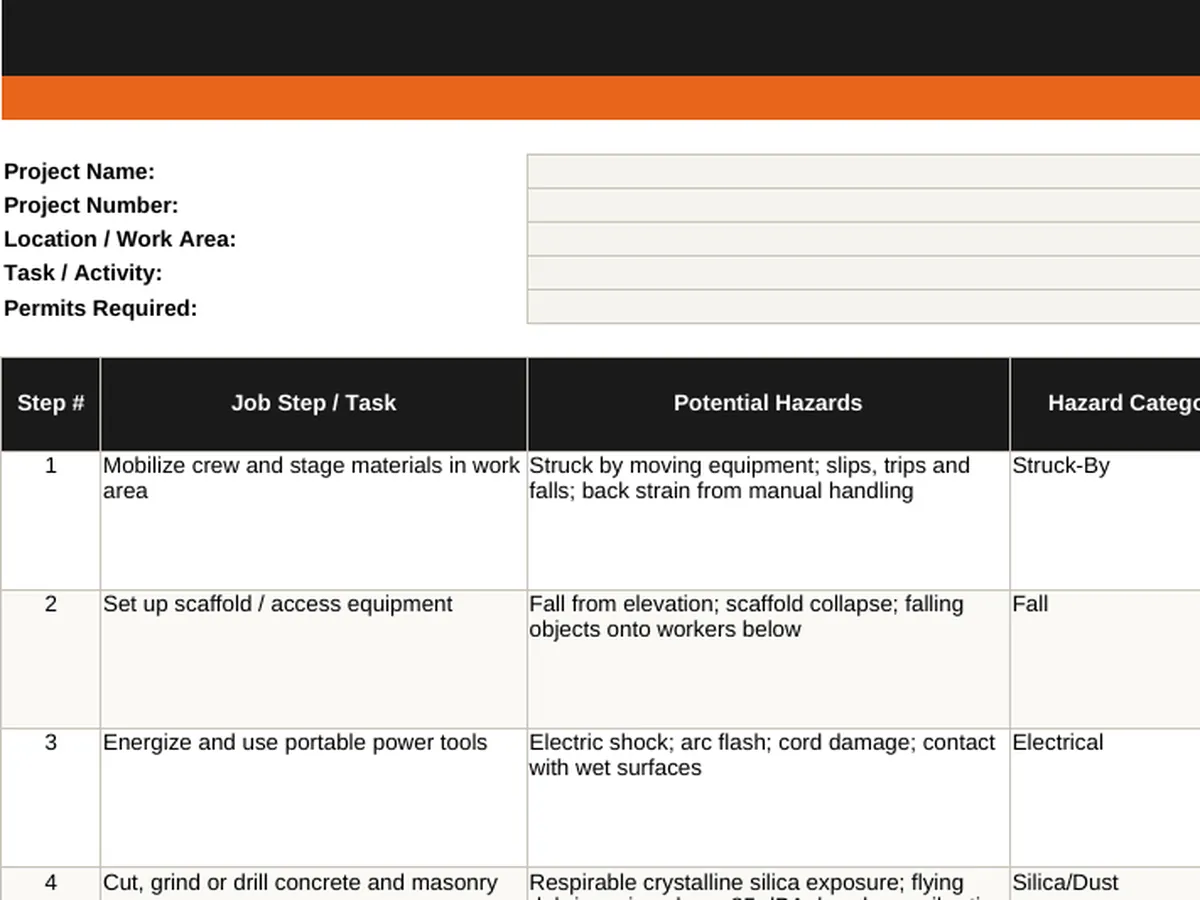
    Free Job Hazard Analysis JHA Excel template preview - project header with job steps, potential hazards, hazard category, likelihood and severity scoring, color-coded risk level, hierarchy of controls, required PPE, responsible person, and status
    DailyBuild_Free_Job_Hazard_Analysis_Template.xlsx
    Download
    Free bundle

    Get all 11 safety templates

    Editable Excel files plus the paper-to-app checklist. Enter your email for the complete safety bundle.

    Instant download | One email list | Unsubscribe anytime

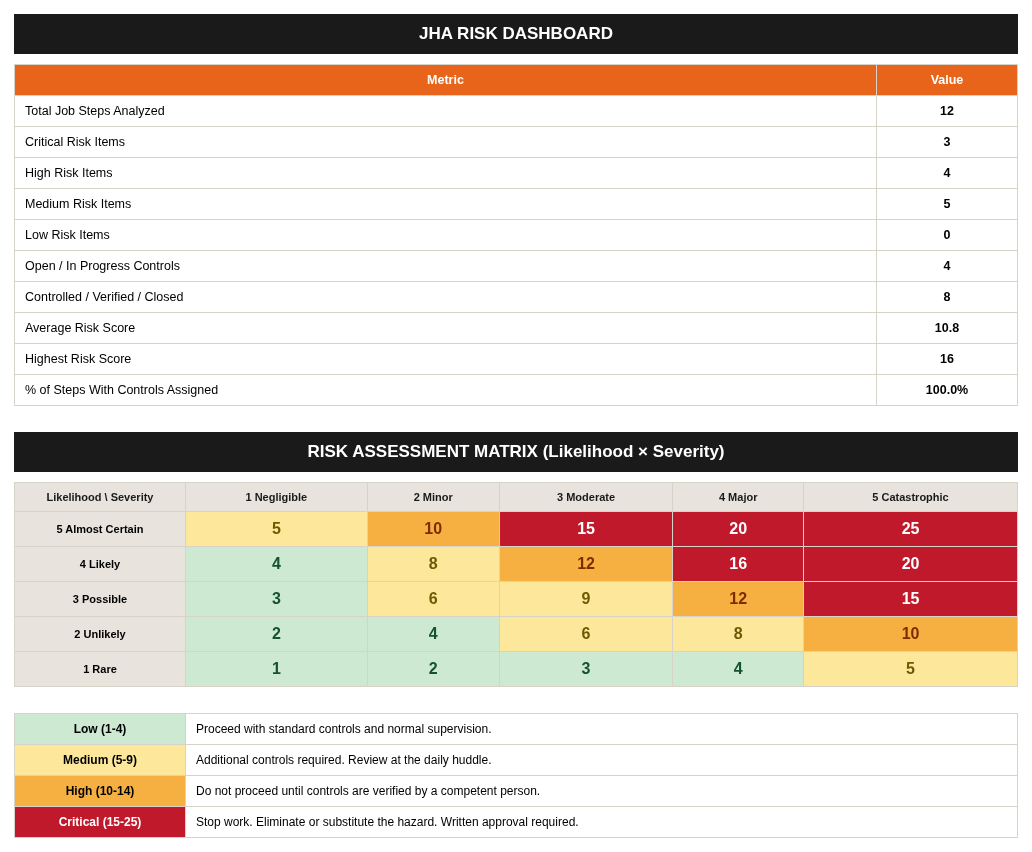
    JHA risk dashboard and 5x5 risk assessment matrix showing likelihood times severity scoring with Low, Medium, High, and Critical action thresholds

    Built-in risk dashboard and 5x5 risk assessment matrix - risk scores color-code themselves and roll up automatically.

    What's inside the template

    Everything a defensible job hazard analysis needs.

    Project & Task Header

    Project name, number, work area, task, crew, permits required, prepared by, reviewed by, and emergency contact.

    Job Step Breakdown

    Sequential job steps in plain language - 12 realistic construction steps pre-filled and 20 blank rows ready for your task.

    Hazard Identification

    Potential hazards for each step plus a hazard category dropdown covering fall, struck-by, caught-in, electrical, silica, excavation, heat, traffic, and more.

    Likelihood x Severity Scoring

    1-5 dropdowns for likelihood and severity. Risk Score and Risk Level calculate automatically for every step.

    Color-Coded Risk Levels

    Low, Medium, High, and Critical shade themselves so the stop-work items are impossible to miss.

    Hierarchy of Controls

    Control measures plus a Control Type dropdown - Elimination, Substitution, Engineering, Administrative, PPE - so PPE is never the only answer.

    Required PPE Column

    Spell out the exact PPE for each step: hard hat, harness, respirator, face shield, cut-resistant gloves, hi-vis, and hearing protection.

    Risk Dashboard

    Total steps, Critical/High/Medium/Low counts, open controls, average risk score, and percent of steps with controls assigned - all live.

    5x5 Risk Assessment Matrix

    A full likelihood x severity matrix with required action written out for every risk band.

    Crew Sign-Off Sheet

    26 signature lines plus preparer, supervisor, and safety manager approval - the record that proves the crew was briefed.

    Configurable Settings Tab

    Edit hazard categories, control types, PPE, and status options to match your company safety program.

    Print & PDF Ready

    Landscape, fit-to-width, repeating headers - clean PDF export for the safety binder and the jobsite wall.

    What's included

    Five tabs. One complete job hazard analysis.

    Built from real pre-task planning workflows used by GCs, subs, and safety teams. Defensible documentation, automatic risk scoring, nothing extra.

    Instructions Tab

    A 9-step walkthrough so any foreman can complete a JHA correctly the first time.

    Job Hazard Analysis Tab

    13-column worksheet: step, task, hazards, category, likelihood, severity, risk score, risk level, controls, control type, PPE, responsible, status.

    Risk Dashboard Tab

    Ten live metrics that tell you in one glance whether the job is safe to start.

    Risk Matrix Tab

    5x5 matrix plus a required-action legend for Low, Medium, High, and Critical.

    Crew Sign-Off Tab

    Print name, company/trade, job title, date, and signature for every worker on the task.

    Settings Tab

    Every dropdown list in one place - hazard categories, control types, PPE, likelihood, severity, and status.

    12 Pre-Filled Examples

    Scaffold, trenching, silica, hot work, confined space, rigging, chemicals, heat, and traffic already written out.

    Automatic Risk Scoring

    Risk Score = Likelihood x Severity, banded 1-4 Low, 5-9 Medium, 10-14 High, 15-25 Critical.

    Hierarchy of Controls Built In

    Control Type dropdown forces the conversation past 'wear your PPE'.

    Control Status Tracking

    Open, In Progress, Controlled, Verified, Closed - so nothing sits half-done.

    Reusable Per Task

    Save a copy per activity, per crew, or per phase and update it whenever conditions change.

    100% Free

    No subscription, no email, no credit card required.

    Why a JHA matters

    Why every contractor should run a job hazard analysis.

    A job hazard analysis (JHA) - also called a job safety analysis (JSA) or activity hazard analysis - breaks a task into its individual steps, identifies what could go wrong at each step, and puts a specific control in place before the work starts. It is the single cheapest safety control in construction: a 20-minute conversation on the tailgate that prevents the fall, the cave-in, or the struck-by that would otherwise define the project.

    What OSHA expects

    OSHA's own guidance (Publication 3071, Job Hazard Analysis) recommends a written JHA for every job with a history of incidents, severe potential consequences, or new and changed processes. Under the General Duty Clause, employers must keep the workplace free of recognized hazards - and a dated, signed JHA is the contemporaneous proof that the hazard was recognized, scored, and controlled before anyone picked up a tool.

    JHA vs. JSA vs. AHA - what's the difference?

    Practically, nothing. JHA (job hazard analysis), JSA (job safety analysis), and AHA (activity hazard analysis, the term used on USACE and federal work) all describe the same document: steps, hazards, controls, and sign-off. This template works for all three - the header simply names the task and the crew performing it.

    Scoring risk instead of guessing

    Most free JHA forms ask you to describe a hazard and stop there. This one scores it. Likelihood (1-5) multiplied by severity (1-5) produces a risk score from 1 to 25 that color-codes itself into Low, Medium, High, or Critical. That single number turns a subjective conversation into a decision rule: Critical items stop work until the hazard is eliminated or substituted, High items require verified controls before proceeding.

    The hierarchy of controls

    A JHA that answers every hazard with "wear PPE" is a liability, not a safety plan. The Control Type column forces the crew up the hierarchy of controls - eliminate the hazard first, substitute it second, engineer it out third, control it administratively fourth, and only then reach for PPE as the last line of defense. Reviewers and owners notice the difference immediately.

    Crew sign-off is the record

    A JHA that nobody read protects nobody. The Crew Sign-Off tab captures every worker's name, trade, title, date, and signature, plus supervisor and safety manager approval. When an incident investigation or an OSHA inspection asks who was briefed and when, that single page answers it.

    When conditions change, re-analyze

    A JHA is not a one-time form. Re-run it whenever the scope, crew, sequence, equipment, weather, or adjacent trades change. Keep the completed copies in the project safety file - together they document a real pre-task planning program rather than a stack of identical photocopies.


    How to use the template

    Complete a job hazard analysis in 20 minutes.

    1. 01

      Fill in the project and task header

      Project name, number, work area, task, crew, permits required, prepared by, reviewed by, and emergency contact.

    2. 02

      Break the job into steps

      List each sequential job step in plain language - one action per row. Most construction tasks break cleanly into 5 to 15 steps.

    3. 03

      Identify the hazards at each step

      Ask what could cause harm: falls, struck-by, caught-in/between, electrical, silica, chemical, heat, noise, traffic. Tag the hazard category from the dropdown.

    4. 04

      Score likelihood and severity

      Pick 1-5 for each from the dropdowns. Risk Score and Risk Level calculate automatically and color-code the row.

    5. 05

      Apply the hierarchy of controls

      Write the specific control, then set Control Type - Elimination, Substitution, Engineering, Administrative, or PPE. Never stop at PPE.

    6. 06

      List the required PPE

      Spell out exactly what the crew wears for that step so there is no ambiguity at the tailgate.

    7. 07

      Assign responsibility and status

      Name the person accountable for each control and track it from Open through In Progress, Controlled, Verified, and Closed.

    8. 08

      Check the Risk Dashboard

      Confirm no Critical item is still Open and that every step has a control assigned before work begins.

    9. 09

      Brief and sign the crew

      Review the JHA at the pre-task meeting, then have every worker sign the Crew Sign-Off tab and route it for supervisor approval.

    Why contractors love this template

    The difference a real job hazard analysis makes.

    Typical Free JHA Forms

    • Blank three-column form
    • No risk scoring
    • No risk matrix
    • PPE listed as the only control
    • No hazard categories
    • No responsibility or status
    • No dashboard or roll-up
    • No crew sign-off page

    DailyBuild JHA Template

    • 13-column analysis worksheet
    • Automatic likelihood x severity scoring
    • Built-in 5x5 risk matrix with actions
    • Hierarchy of controls enforced
    • 16 hazard categories pre-loaded
    • Responsible person and control status
    • Live risk dashboard with 10 metrics
    • 26-line crew sign-off with approvals

    Excel vs. DailyBuild

    When pre-task planning outgrows the spreadsheet.

    The template is perfect for one task and one crew. DailyBuild handles every JHA, every crew, every project, from the field.

    CapabilityExcel TemplateDailyBuild Software
    Job Step Breakdown
    Hazard Identification
    Risk Scoring & Matrix
    Hierarchy of Controls
    Required PPE
    Crew Sign-Off
    Photos on Hazards
    Mobile Field Completion
    Digital Crew E-Signatures
    Linked Daily Reports
    Tasks for Open Controls
    Automated PDF Reports
    Cloud Storage & Backup
    Searchable Historical Records

    What changes when you switch

    • Weather fills itself in for every report
    • Crew hours flow straight into timesheets
    • One tap sends a branded, signed PDF
    Start Free Trial

    Ready to run JHAs from the jobsite?

    Inside DailyBuild

    The DailyBuild safety hub

    • E-signatures from every worker
    • Attendance captured on site
    • Records filed to the project
    Start Free Trial

    No credit card required to start your trial

    Frequently asked

    Job Hazard Analysis Template FAQs

    Free iPhone and Android apps

    Run these logs from your phone

    The DailyBuild app turns the same daily report, timesheet and punch list into something your crew fills out on site - photos, hours and signatures included, with branded PDFs sent automatically.

    Download DailyBuild on the App StoreGet DailyBuild on Google Play
    DailyBuild mobile app Today screen with today's report, time, photo and safety actions

    Plan the Work. Analyze the Hazards. Send Everyone Home.

    Download the free DailyBuild Job Hazard Analysis (JHA) Template today or upgrade to DailyBuild to run JHAs, safety inspections, daily reports, tasks, photos, and PDF reporting from one place.
