

DailyBuild Construction Daily Reports App
    Free Excel Template · No signup

    Free Construction RFI Log Template for Excel

    Track, manage, and document every Request for Information from start to close. Capture RFI numbers, responsible parties, due dates, statuses, responses, schedule and cost impact, and aging - with a live dashboard showing open, overdue, and answered RFIs.

    Download Free Excel Template
    Track RFIs

    14-day free trial. No credit card required

    Preview Template

    Used by GCs, PMs, and superintendents to manage thousands of RFIs.

    • No signup required
    • Microsoft Excel compatible
    • Live dashboard & metrics
    • 100% free
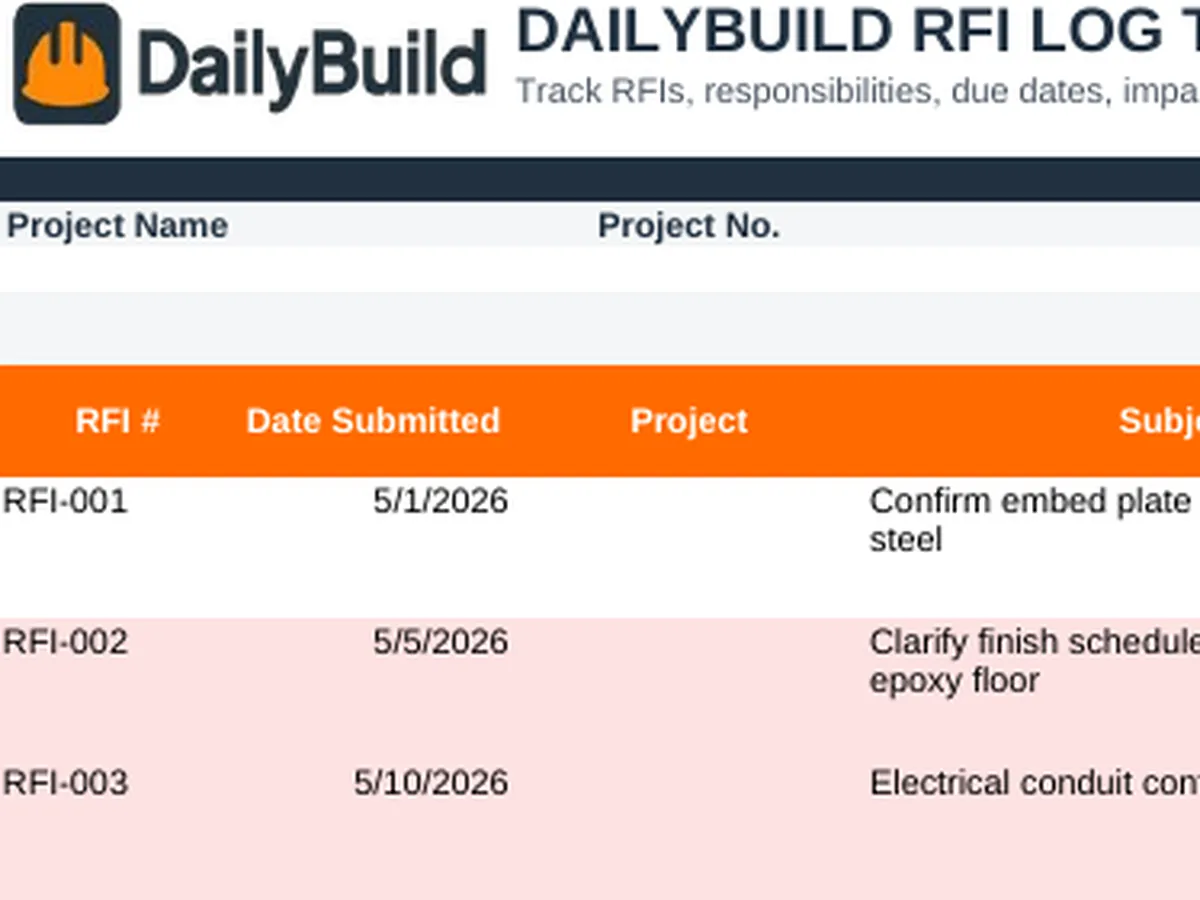
    Free construction RFI log Excel template preview - project info, RFI number, date submitted, subject, from/to, discipline, status, priority, due date, response, schedule and cost impact
    DailyBuild_Free_RFI_Log_Template.xlsx
    Download
    Free bundle

    Get all 30 construction templates

    Editable Excel files plus the paper-to-app checklist. Enter your email for the complete construction bundle.

    Instant download | One email list | Unsubscribe anytime

    RFI dashboard with total RFIs, open, overdue, closed, avg days open, schedule and cost impacts, status counts, priority counts, and open RFI review table

    Live RFI Dashboard - open RFIs, overdue items, impacts, priorities, and status trends at a glance.

    What's inside the template

    Every detail contractors track from RFI submission to formal close.

    Project Information

    Project name, number, client, prepared by, and report date in one professional header.

    RFI Log

    Single-row entries with RFI #, date submitted, subject, from/to, discipline, status, priority, due date, response, and impacts.

    Live RFI Dashboard

    Total RFIs, open, closed, overdue, high/critical, avg days open, and schedule/cost impact tiles update automatically.

    Status Tracking

    Draft, Submitted, Under Review, Answered, Closed, and Void driven by validated dropdowns.

    Priority Tracking

    Low, Medium, High, Critical, and Urgent priorities roll up to dashboard counts.

    Days Open & Overdue

    Auto-calculated aging from date submitted to today, with overdue flags driven from due date and response date.

    Responsible Party Assignment

    Assign every RFI to architect, engineer, owner, or subcontractor so accountability is unambiguous.

    Schedule & Cost Impact

    Flag RFIs that carry schedule or cost impact and roll the count into the dashboard automatically.

    Configurable Dropdowns

    Discipline, status, priority, and responsible party all driven by a Settings tab.

    What's included

    Everything you need to manage RFIs on any project.

    Built from real RFI workflows used by GCs, subs, and design teams. Defensible documentation, live reporting, nothing extra.

    Project Information Header

    Project name, number, client, prepared by, and report date.

    Professional RFI Log

    Unique RFI #, subject, from/to, discipline, status, priority, dates, response, impacts, and notes.

    Live Dashboard

    Total, open, closed, overdue, high/critical, avg days open, schedule and cost impacts, and pending review tiles.

    Status Workflow

    Draft, Submitted, Under Review, Answered, Closed, and Void with validated dropdowns.

    Priority Workflow

    Low, Medium, High, Critical, and Urgent priorities feed dashboard counts.

    Auto Aging & Overdue Flags

    Days Open and Days Late calculate automatically with conditional formatting for overdue RFIs.

    Responsible Party Assignment

    Assign every RFI to architect, engineer, owner, GC, or sub - no orphan rows.

    Schedule & Cost Impact Tracking

    Flag and roll up every RFI that carries schedule or cost exposure.

    Open vs. Closed Reporting

    Status counts and open RFI summary table for quick reporting to owners and PMs.

    Configurable Dropdowns

    Discipline, status, priority, and responsible party driven by the Settings tab.

    Instructions Tab

    Quick-start instructions so any team member can pick up the log on day one.

    Print & PDF Ready

    Formatted for clean PDF export, owner reporting, and printed RFI packages.

    100% Free

    No subscription, no email, no credit card required.

    Why RFIs matter

    Why contractors document every Request for Information.

    A construction RFI is the formal mechanism contractors use to resolve ambiguity in the contract documents. Every drawing conflict, missing detail, spec clarification, or differing site condition flows through an RFI - and how quickly RFIs get answered (and how cleanly they get logged) is one of the strongest predictors of whether a project finishes on time and on budget. The contractor with a disciplined RFI tracker wins on every claim and every closeout. The one without it watches the schedule slip in real time.

    Preventing missed responses

    RFIs fall through the cracks when nobody owns them. A disciplined RFI log template with status, responsible party, and due date converts a pile of email threads into a managed list - so the PM knows exactly what to chase every Monday and the design team knows exactly what is sitting on their desk.

    Defending delay claims

    Late RFI responses are one of the most common drivers of construction delay claims. A dated RFI log showing submission date, due date, and actual response date is the contemporaneous record that turns "we were waiting on the architect" into a defensible claim - and protects the contractor from disputes over float, critical path, and schedule extensions.

    Improving design team communication

    Sending the architect and engineer a weekly RFI summary - total, open, overdue, average response time - sets a tone of professionalism and shared accountability. Design teams stop missing turnarounds because the log makes their backlog visible to the owner.

    Subcontractor accountability

    Many RFIs originate with subs who hit a field conflict. A clean contractor RFI log with discipline, from/to, and responsible party tagged makes it obvious which subs are asking good questions, which ones are flagging real issues, and which trades are most exposed to design ambiguity.

    Defensible closeout records

    Years after closeout, when an owner raises a warranty issue or a defect claim, the RFI log is part of the historical record showing exactly what was asked, who answered, and when. A consistent RFI log spreadsheet is the cheapest documentation insurance policy on any construction project.


    How to use the template

    Stand up a complete RFI log in 10 minutes.

    1. 01

      Enter project information

      Add project name, number, client, prepared by, and report date in the header.

    2. 02

      Customize the Settings tab

      Tweak discipline, status, priority, and responsible party dropdowns to match your RFI workflow.

    3. 03

      Log each new RFI

      Capture RFI #, date submitted, subject, from/to, discipline, and a clear question or description.

    4. 04

      Tag status, priority, and discipline

      Use dropdowns to keep reporting clean - Draft/Submitted/Under Review/Answered/Closed and Low/Medium/High/Critical/Urgent.

    5. 05

      Assign responsibility and due date

      Assign every RFI to architect, engineer, owner, GC, or sub and set a due date so aging and overdue flags drive accountability.

    6. 06

      Flag schedule and cost impact

      Mark RFIs that carry schedule or cost exposure so the dashboard rolls up impact counts automatically.

    7. 07

      Log the response and close out

      Record response date, response summary, and move status to Answered or Closed when the issue is fully resolved.

    8. 08

      Review the Dashboard

      Check total RFIs, open, overdue, average days open, and schedule/cost impacts before every owner and design meeting.

    Why contractors love this template

    The difference a real RFI log makes.

    Typical Free RFI Logs

    • Basic spreadsheet
    • No dashboard
    • No status workflow
    • No priority tracking
    • No aging or overdue flags
    • No impact tracking

    DailyBuild RFI Log

    • Live dashboard
    • Status workflow
    • Priority tracking
    • Responsible party assignment
    • Auto aging & overdue flags
    • Schedule & cost impact tracking
    • Average days open metric
    • Owner-ready reporting

    Excel vs. DailyBuild

    When RFI tracking outgrows the spreadsheet.

    The template is perfect for one project and one PM. DailyBuild manages every RFI, every project, from the field.

    CapabilityExcel TemplateDailyBuild Software
    RFI Log
    Status Workflow
    Priority Tracking
    Aging & Overdue Flags
    Dashboard Reporting
    Schedule & Cost Impact
    Attached Drawings & Photos
    Mobile Field Entry
    Email Notifications
    Linked Daily Reports
    Tasks
    Automated PDF Reports
    Cloud Storage
    Searchable Historical Records

    What changes when you switch

    • Weather fills itself in for every report
    • Crew hours flow straight into timesheets
    • One tap sends a branded, signed PDF
    Start Free Trial

    Ready to automate RFI tracking?

    Inside DailyBuild

    RFI tracking in DailyBuild

    • Every RFI tracked by status
    • Daily AI drafts the RFI for you
    • Answers filed to the project
    Start Free Trial

    No credit card required to start your trial

    Frequently asked

    RFI Log Template FAQs

    Free iPhone and Android apps

    Run these logs from your phone

    The DailyBuild app turns the same daily report, timesheet and punch list into something your crew fills out on site - photos, hours and signatures included, with branded PDFs sent automatically.

    Download DailyBuild on the App StoreGet DailyBuild on Google Play
    DailyBuild mobile app Today screen with today's report, time, photo and safety actions

    Stop Losing Track of RFIs. Protect Your Schedule.

    Download the free DailyBuild Construction RFI Log Template today or upgrade to DailyBuild to automate RFIs, daily reports, tasks, photos, and PDF reporting from one place.
